
When FundamentalLabs deployed Claude to build an Excel agent, the model passed 5 out of 7 levels of the Financial Modeling World Cup and achieved 83% accuracy on complex Excel tasks, (Anthropic, Claude for Financial Services, 2026). That is an external competition result, not a vendor claim. And it’s the most honest starting point for any conversation about Claude for finance.
The more difficult question is what that number actually means for a team. Finance professionals evaluating AI tools right now face a specific problem: the marketing is loud, the governance questions are real, and the gap between a demo and a production-ready workflow is wider than most vendors admit.
This guide is built for finance professionals at the consideration stage and covers Claude use cases, a model selection framework, a 90-day deployment roadmap, and a direct comparison against the other AI tools a financial team is likely to evaluate.
Key takeaways:
- Claude Opus 4 scored 83% accuracy on complex Excel tasks in the Financial Modeling World Cup.
- Claude Fable 5 completes everyday spreadsheet runs 25–30% faster than Opus 4.8.
- Claude Opus 4.8 reaches 54% on Vals AI’s Finance Agent v2 benchmark, competitive enough for agentic finance workflows such as KYC screening.
- Hallucination is primarily a workflow design problem, not just a model quality issue.
- Claude can’t serve as a licensed financial advisor or hold fiduciary responsibility.
- Its value lies in compressing the preparation work surrounding regulated decisions while leaving professional judgment with qualified experts.
A quick note on naming before you go further. Claude’s model lineup has four tiers, roughly ordered by capability and cost:
- Haiku – built for speed and volume, with lighter reasoning capabilities
- Sonnet – the balanced default for most structured work
- Opus – the top-tier reasoning model, the one most finance teams will use for anything audit-facing
- Mythos tier – released June 2026, positioned above Opus for the hardest, longest-running agentic work. Same base model, two variants: Mythos 5 and Fable 5 (adds safety measures for biology, cybersecurity, and LLM R&D)
What Claude can do for finance teams
No single AI tool is best for every finance task but Claude stands out for work that demands:
- Long-context reasoning
- Precise document handling
- Structured output
For finance teams evaluating AI, the more useful question is whether a tool can handle the specific workflows that consume analysts’ time: financial modeling, filing review, compliance drafting, and month-end close.
We are not just seeing acceleration of the work, but a way for the work to actually be transformed – Nick Lin (Claude Product Lead, Financial Services)
Learn more about how Claude is transforming financial services in this video:
Financial modeling and Excel automation
FundamentalLabs tested Claude Opus 4 in the Financial Modeling World Cup, where it completed 5 of the 7 levels and reached 83% accuracy on advanced spreadsheet tasks.
This is relevant because the competition uses real-world Excel problems under time pressure. For finance professionals, it shows that Claude can handle:
- Formula construction
- Scenario modeling
- Structured data manipulation
These capabilities extend beyond basic spreadsheet assistance.
Claude’s Microsoft 365 add-ins let teams use it within Excel, Word, and PowerPoint, making it easier to work across documents, spreadsheets, and presentations without constantly copying information between tools.
Earnings transcript and filing review
Reviewing a 150-page annual report or analyzing an earnings call transcript for forward-looking guidance can take a senior analyst several hours. Claude’s extended context window can support:
- Processing complete filings in a single pass
- Extracting key metrics
- Identifying changes in language between reporting periods
- Drafting structured summaries
Anthropic’s Financial Analysis Solution connects directly to market data feeds and internal data stored in platforms like Databricks and Snowflake, with hyperlinks back to source materials for instant verification.
The ecosystem extends further through integrations like Daloopa, which provides financial data from 6,000+ public companies, including SEC filings, financial statements, and operational KPIs.
Compliance document drafting
Compliance teams spend a significant amount of time producing documents that follow predictable formats, from policies and disclosures to procedure manuals and regulatory responses.
In finance and accounting workflows, Claude can:
- Generate first drafts
- Apply consistent terminology
- Flag sections that may require legal or compliance review
The higher-value use is structured drafting. Given a regulatory requirement and an existing policy template, Claude can produce a gap analysis and a revised draft in one workflow.
Human review remains essential, but the starting point is far stronger than a blank page.
Due diligence research and summarization
Deal teams running due diligence face a volume problem: hundreds of documents, tight timelines, and the risk of overlooking a material issue buried in an exhibit or supporting file
Anthropic offers ready-to-run agent templates for finance-related tasks, including pitchbook preparation and KYC screening workflows available as plugins in Claude Cowork and Claude Code.
In practice, these agents can reduce lengthy document-review cycles by reading, categorizing, and identifying anomalies across a large set of materials. Analysts can then concentrate on interpretation and judgment rather than manual extraction.
Reconciliation and reporting automation
Month-end close remains one of the most labor-intensive processes in finance operations. Anthropic’s pre-built finance agent templates include:
- A general ledger reconciler for reviewing account balances
- A closing agent that can work through checklists
- Support for preparing draft journal entries
- Close report generation
These templates must still be configured around the organization’s accounting systems, internal policies, and approval controls.
Which Claude model should finance teams use?
Claude models don’t perform equally across all finance tasks, and choosing the wrong model forces a trade-off between accuracy and speed. The decision comes down to two factors:
- Task complexity
- The potential impact of an error
Claude Opus 4 vs. Claude Fable 5: When each wins
Claude Opus 4 is the stronger choice when the output goes to:
- An auditor
- A regulator
- A board
As discussed earlier, Opus 4 has performed strongly on complex spreadsheet tasks. Opus 4.8 also performs well on Vals AI’s Finance Agent benchmark at ~54%, making it a suitable choice for agentic workflows such as:
- Autonomous KYC screening
- Multi-document deal analysis
Fable 5 is better suited to high-volume work. It outperforms Opus 4.8 on Anthropic’s everyday spreadsheet suite across all effort levels. For recurring tasks such as weekly reporting packs, earnings transcript summaries, and routine data normalization, the time savings can add up across a team.
Note: Fable 5 carries a 30-day data-retention policy, so it’s worth checking against your compliance requirements before routing sensitive data through it.
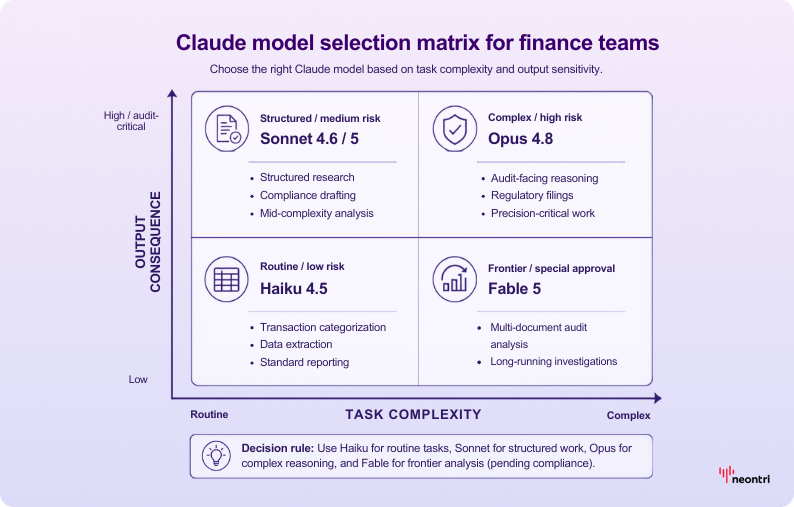
Task complexity and output sensitivity as the deciding factors
The Claude model selection framework is based on the difficulty of the work and the consequences of an error:
- Haiku 4.5 – routine work: transaction categorization, data extraction, standard reporting
- Sonnet 4.6 / Sonnet 5 – structured research, compliance drafting, mid-complexity analysis
- Opus 4.8 – complex, audit-facing reasoning where correctness matters
- Fable 5 – frontier work (multi-document audit analysis, long-running investigations) – but only after clearing the 30-day retention policy with compliance
Benchmark anchors for each Claude model
These benchmark anchors show which Claude model is best suited to common finance tasks.
| Task type | Recommended model | Key benchmark | Best for |
|---|---|---|---|
| Spreadsheet automation | Claude Fable 5 | 25–30% faster than Opus 4.8 on an everyday spreadsheet suite | High-volume, recurring data tasks where speed is critical |
| Financial modeling | Claude Opus 4 | 83% accuracy on complex Excel tasks | Multi-step financial models where formula errors can have downstream consequences |
| Compliance drafting | Claude Sonnet | Strong structured reasoning with lower latency than Opus 4 | Policy documents, regulatory summaries, and internal procedure drafts |
| Earnings analysis | Claude Fable 5 | Fastest turnaround for transcript and financial filing reviews | Rapid analysis of quarterly filings across a broad coverage universe |
| Internal tool development | Claude Opus 4.8 | ~54% on the Vals AI Finance Agent benchmark (as of August 2026; benchmark updated periodically) | Agentic workflows, autonomous agents, and multi-step API integrations |
The practical decision rule: use Opus 4 when the output requires human approval before leaving the firm. For internal dashboards, recurring analysis, or first drafts, Fable 5 offers a faster option. Sonnet covers the middle ground, including structured compliance and research work that is important but not audit critical.
ROI and the business case for Claude in finance
Finance leaders approving AI spend need more than capability demos. They need a defensible number. The ROI case for Claude in finance rests on two pillars:
- Measurable time compression across high-volume workflows
- Accuracy benchmarks that hold up under scrutiny
Time savings by workflow type
This framework estimates potential time savings across common finance workflows and provides a starting point for ROI calculations. Actual results will depend on the team’s current tools, prompt quality, and review protocols.
Add your own headcount and hourly cost assumptions to produce an estimate your CFO can evaluate.
Claude ROI estimation framework for finance:
| Workflow | Manual time estimate | Claude-assisted time | Accuracy benchmark | Risk level |
|---|---|---|---|---|
| Earnings transcript review | 3–4 hours per filing | Under 1 hour | High accuracy for factual extraction; forward-looking statements require verification | Medium |
| Excel financial modeling | 6–10 hours per model | Materially reduced, with documented speed gains of 25%–30% | 83% on complex Excel tasks in the Financial Modeling World Cup benchmark | Medium–high |
| Reconciliation automation | 4–8 hours per close cycle | Reduced to a few hours with structured data inputs | High for rule-based matching; lower for judgment-based exceptions | Low-medium |
| Compliance document drafting | 2–5 hours per document | Under 1 hour for the first draft | Strong structural accuracy; legal review is required before submission | High |
| Due diligence research | 8–20 hours per target | 2–5 hours with Claude-assisted summarization | High for synthesis; source verification remains a human responsibility | Medium |
Accuracy benchmarks that anchor the numbers
The 83% accuracy figure is relevant because it comes from a competitive setting designed to test financial reasoning under pressure.
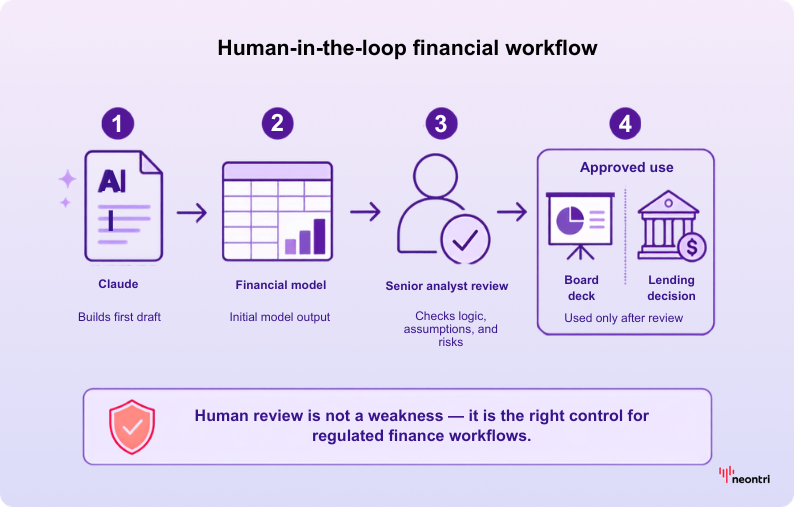
In practice, Claude can produce a strong first draft of a financial model, but a senior analyst should still review the output before it’s used in a board presentation or lending decision. That human-in-the-loop step isn’t a limitation; it’s an essential part of any AI-supported process in a regulated environment.
How to build your internal business case
A finance-specific business case needs four components to withstand budget review:
- Baseline hours: Document how long your team currently spends on each workflow listed above. Time-tracking data from the previous quarter provides a useful baseline.
- Assisted hours: Run a two-week pilot on one workflow. Earnings review is a relatively low-risk starting point. Measure the time required with Claude against the existing baseline.
- Fully loaded cost: Multiply time saved by the blended hourly cost of the analysts involved. Include management review time, not just execution time.
- Risk-adjusted value: Apply a discount to workflows rated as high risk, using a factor agreed with the risk team. Compliance document drafting, for example, still requires legal approval, so the time savings are real, but the reduction in liability is limited.
Governance and compliance controls for Claude deployments
Finance teams deploying AI for the first time underestimate how quickly a governance gap becomes a regulatory exposure. Claude isn’t exempt from this. The controls you build before the first production prompt matter more than the model you choose.
Hallucination risk: Where finance teams are most exposed
While hallucination in general business content is disruptive, in finance it may corrupt a filing, misstate a covenant, or produce a valuation that passes through several review layers before the error is identified.
The highest-risk workflows are those in which Claude generates a specific number, cites a regulation, or summarizes a contract clause, and the reviewer trusts the output because the surrounding prose appears authoritative.
One example of a common failure pattern is a reviewer who skims a Claude-generated memo, corrects a formatting issue, and sends the document without checking the underlying figures. The error remains because the review focused on style rather than substance.
Therefore, hallucination shouldn’t be treated only as a model quality problem. It’s also a workflow design issue, and the fix is structural.
A concrete error-catch workflow for audit-critical outputs
For any Claude output that feeds a regulatory filing, client report, or board deck, build a two-stage review:
- Source verification pass: Every number, citation, and regulatory reference in the Claude output gets traced back to a primary source before the document moves forward. Assign this task to the analyst who owns the underlying data rather than to the person who wrote the prompt.
- Independent sense-check: A second reviewer who didn’t see the prompt reads the output independently and flags anything that conflicts with their knowledge of the deal, filing, or position. This catches plausible errors that pass a surface read.
For lower-risk outputs, such as internal summaries, first-draft memos, and research digests, a single reviewer using a checklist may be sufficient. The level of review should reflect the consequences of the output, with stricter controls applied to higher-risk work.
Model version drift: The underappreciated risk
When Anthropic updates a Claude model, the outputs for identical prompts can change. For most use cases, this is manageable. For finance teams running workflows that depend on an audit trail, however, it creates a reproducibility problem: the model that generated last quarter’s analysis may not produce the same output today.
One mitigation is model version pinning through the Claude API. When a workflow is pinned to a specific model version, teams can avoid unexpected changes until they choose to upgrade. Treat a model upgrade in the same way as a software release: test it against the existing prompt library, document the change, and obtain approval before moving production workflows to the new version.
Claude finance deployment governance checklist
Use this checklist before moving any Claude workflow from pilot to production. Each control maps to regulatory frameworks that may be relevant to finance and accounting use cases.
| Control area | Action required | Owner | Regulatory relevance |
|---|---|---|---|
| Data classification | Classify all data inputs before they enter Claude prompts. Restrict MNPI, client PII, and confidential deal data to approved environments only. | Data governance / Legal | SOX, GDPR, MiFID II |
| Prompt audit logging | Enable full prompt and response logging in Claude Enterprise or via API. Retain logs according to the organization’s document-retention policy. | IT / Compliance | SOX audit trail, MiFID II record-keeping |
| Output review gate | Define review tiers based on the consequence of each output. For example, require a two-stage review for regulatory filings and a single-reviewer checklist for internal summaries. | Finance operations / Risk | SOX, internal model risk policy |
| PII handling | Mask or redact personally identifiable information before it enters any prompt. Confirm that Claude’s data-processing agreements cover the relevant jurisdiction. | Legal / Privacy | GDPR, CCPA, local data-protection laws |
| Model version pinning | Pin production workflows to a specific Claude API model version and record that version in the model risk register. | IT / Model Risk | SOX reproducibility, internal MRM frameworks |
| Hallucination catch workflow | Implement source-verification and independent sense-check steps for all audit-critical outputs. Assign final ownership to the data owner rather than the prompt author. | Finance / Compliance | SOX, MiFID II suitability requirements |
| Regulatory mapping | Map each active Claude use case to the regulations it may affect. Update the mapping whenever use cases change or regulations are amended. | Compliance | SOX, GDPR, MiFID II, sector-specific rules |
| Access controls | Restrict Claude Enterprise access by role, apply least-privilege principles, and review access rights quarterly. | IT / HR | GDPR data minimization, SOX access controls |
| Incident response | Establish a documented response plan for AI-generated errors that reach clients, regulators, or public filings. Include escalation paths and notification timelines. | Risk / Legal | MiFID II, GDPR breach notification, SOX |
| Periodic model re-evaluation | Review pinned model versions quarterly against updated benchmarks and regulatory guidance. Document the decision to upgrade or retain the current version. | Model risk / Compliance | SOX, internal MRM policy, emerging AI regulation |
Claude vs. other AI tools for finance
Claude is a strong choice for finance work, particularly for document-heavy tasks, compliance drafting, and multi-step analysis. Its strongest models also perform well on finance-specific benchmarks. However, no single AI tool is best for every finance workflow, and the right choice depends on the team’s day-to-day needs.
Where Claude leads and where it doesn’t
Claude, GPT-4o, Gemini, and Perplexity Finance differ across the areas most relevant to finance teams. Pricing also varies, so current rates should be confirmed with each vendor before budgeting.
| Tool | Finance benchmark | Excel integration | Compliance features | Pricing model | Best use case |
|---|---|---|---|---|---|
| Claude | ~54% on the Vals AI Finance Agent benchmark (Claude Opus 4.8) | Native integration through Claude add-ins for Excel, Word, and PowerPoint | Enterprise data controls, zero-data-retention options, SOC 2 | Pro, Team, and Enterprise tiers; usage-based API pricing | Long-form analysis, compliance drafting, and multi-agent financial workflows |
| GPT | No published finance-specific benchmark | Deep integration through Microsoft Copilot and Excel | Microsoft Purview compliance layer available at the enterprise tier | ChatGPT Plus, Team, and Enterprise; usage-based API pricing | Broad productivity tasks, particularly within Microsoft 365 |
| Gemini | No comparable finance benchmark available | Google Sheets integration, with more limited Excel support | Google Workspace DLP controls; Gemini for Workspace enterprise add-on | Gemini Advanced, Google One AI Premium, and Workspace enterprise add-on | Google Workspace and conducting data analysis in Sheets |
| Perplexity Finance | No dedicated finance benchmark published | No native Excel integration | Limited enterprise compliance controls | Pro subscription; no enterprise tier at the time of writing | Real-time market-data research and earnings summaries rather than document-heavy workflows |
GPT’s main advantage is its deep integration with the Microsoft ecosystem. For firms that rely on Microsoft 365 and already have Copilot licenses, GPT through Copilot can be difficult to displace for everyday productivity tasks.
We want to do with finance is making sure that these systems can connect all of the core data sources that finance analysts work in. We really want to start pushing Claude’s capabilities so that it is an end-to-end agentic autonomous system. – Nick Lin (Claude Product Lead, Financial Services)
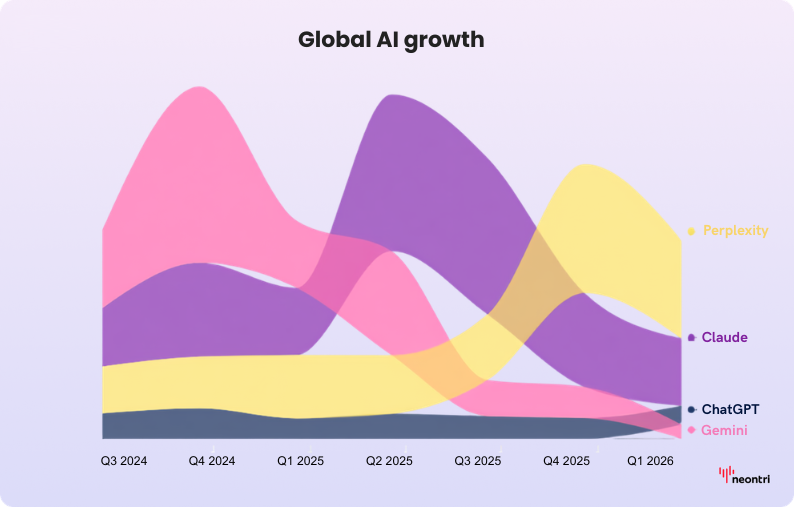
Finance-specific tools: Bloomberg GPT and Perplexity Finance
BloombergGPT is a proprietary language model rather than a general-purpose AI assistant. It was trained on Bloomberg’s financial data and designed for tasks such as financial sentiment analysis, information extraction from filings, and entity recognition. Bloomberg hasn’t released it as a standalone product or public API. Its AI capabilities are instead integrated into the Bloomberg ecosystem.
For that reason, Bloomberg GPT isn’t a direct alternative to Claude for finance teams seeking a configurable model for document analysis, workflow automation or custom agent development.
Perplexity Finance is better suited to market research and financial data retrieval. It can surface current market data, filings, earnings information, analyst estimates, and related context, with links to supporting sources. Its finance tools can also support structured, multi-step research.
Its main focus is research and data retrieval, while Claude is better suited to document drafting, internal process automation, and extended analysis across proprietary materials.
Pricing and plan tiers for finance teams
For most finance teams evaluating Claude, the choice is between Claude Team and Claude Enterprise. Team plans are suited to smaller groups with shared usage, while Enterprise adds:
- Custom system prompts
- SSO
- Audit logs
- Data retention controls required by compliance teams
API access also enables the agent templates and Microsoft add-ins described in Anthropic’s finance agent release.
Pricing varies, so current rates should be confirmed on Anthropic’s website before setting a budget.
In summary:
- Claude performs strongly on finance-specific benchmarks and offers compliance-focused controls.
- GPT-4o leads on Microsoft ecosystem integration.
- Gemini is a strong fit for teams using Google Workspace.
- Perplexity Finance is better suited to focused research than broad workflow automation.
How to deploy Claude in finance: A 90-day adoption roadmap
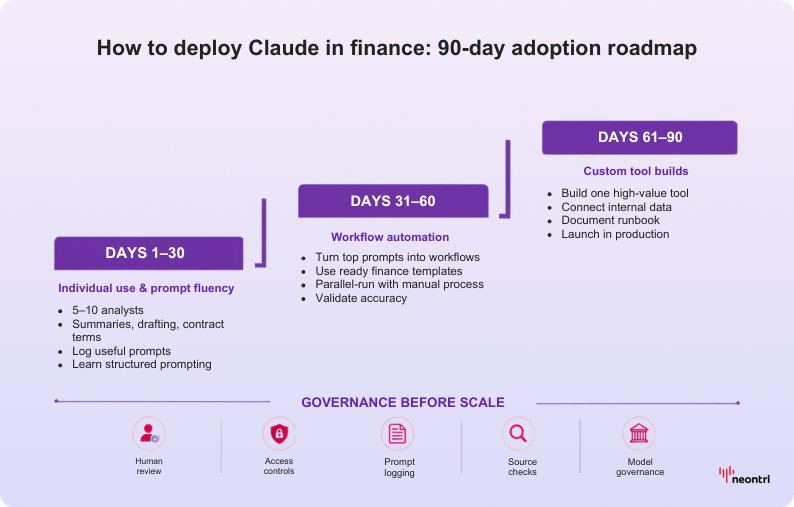
Start with individual analysts using Claude Chat for research and drafting. Then introduce Cowork automation for repeatable workflows, followed by custom tools built with Claude Code for proprietary processes.
That three-layer progression – Chat, Cowork, and Code – is the fastest path from pilot to production while keeping governance controls in place.
The teams that get the most from Claude in finance aren’t the ones who deployed it fastest. They are the ones who built governance controls before scaling. The roadmap below brings both elements together.
Phase 1 (Days 1–30): Individual use and prompt fluency
The goal at this stage is to build prompt fluency, with output volume as a secondary concern. Analysts should become comfortable enough with Claude to move beyond treating it as a search engine and start using it as a reasoning partner.
Select a small group of five to ten analysts from FP&A, research, and compliance. Ask each participant to use Claude for tasks they already manage, such as:
- Summarizing earnings calls
- Drafting variance commentary
- Pulling key terms from vendor contracts
Request them log every prompt that produces a useful result. This record will become the prompt library for Phase 2.
By day 30, each analyst should be able to write a structured prompt without support, identify one workflow where Claude saves meaningful time, and flag one type of output that requires human review before use.
Phase 2 (Days 31–60): Workflow automation with Cowork
Phase 2 turns the best individual prompts into repeatable team workflows with Claude Cowork. Anthropic provides ten ready-to-run agent templates for financial services, covering tasks such as pitchbook assembly, KYC screening, and month-end close. This means teams don’t need to build every workflow from scratch.
Choose two or three workflows from the Phase 1 prompt library that run on a predictable schedule. Configure them in Cowork, assign a workflow owner for each, and run them alongside the existing manual process for the first two weeks. This parallel period establishes an accuracy baseline. If Claude’s output matches or improves on the manual version, the manual step can be retired.
The Microsoft 365 add-ins for Excel, PowerPoint, and Word become useful here. Analysts can trigger Cowork automations directly from the tools they already use, reducing the friction that often limits adoption in enterprise AI rollouts.
Phase 3 (Days 61–90): Custom tool development with Claude Code
Phase 3 focuses on workflows that are too proprietary or complex for off-the-shelf templates. Claude Code allows engineering teams to build custom integrations with internal data, whether it’s stored in Databricks, Snowflake, or a bespoke data warehouse.
Neontri’s AI-powered lending decisioning engine followed a similar pattern, combining automated scoring, workflow orchestration, and regulatory controls in one system. Although it wasn’t built with Claude, it shows what this level of integration can involve in practice.
Start with one high-value workflow that occurs frequently, such as a custom model review assistant, an automated regulatory filing checker, or a deal screening tool connected to the internal CRM. Keep the scope narrow. A focused tool that runs reliably every week is more valuable than a broad one that requires constant maintenance.
By day 90, the team should have at least one custom tool in production, a documented prompt library from Phase 1, and two or three Cowork automations running without manual intervention.
Role assignments and success KPIs for each phase
Clear ownership and measurable outcomes keep each phase of the rollout on track.
| Phase | Days | Key activities | Success KPI | Owner |
|---|---|---|---|---|
| Phase 1: Individual use | 1–30 | Train analysts on prompting, log useful outputs, and identify which output types require review. | Each participant can write structured prompts independently, and the shared prompt library contains at least 20 entries. | FP&A or Research Lead |
| Phase 2: Workflow automation | 31–60 | Configure Cowork templates, run automated and manual processes in parallel, and integrate Microsoft 365 add-ins. | At least two automations run without manual intervention, and parallel-run accuracy has been validated. | Finance Operations Manager |
| Phase 3: Custom tool build | 61–90 | Build one custom Claude Code integration connected to internal data, document the workflow, and hand it over to the team. | One custom tool is in production, the runbook is complete, and the governance checklist has been approved. | Finance Engineering Lead, with CFO sign-off |
Can Claude be used as a financial planner?
Claude isn’t a licensed financial advisor and can’t serve as a personal financial planner. It can’t hold fiduciary responsibility, provide regulated investment advice, or replace a CFP or RIA. It can, however, support institutional finance workflows such as research, analysis, modeling, and document drafting.
The distinction matters because the two use cases carry different risks. A finance professional using Claude to analyze a portfolio company’s capital structure is doing internal analytical work. An individual asking Claude to recommend how to allocate retirement savings is requesting regulated advice, and Claude will appropriately decline to provide it in that form.
Claude is most useful in the preparation work that supports financial planning decisions:
- Summarizing market research
- Stress-testing assumptions in a model
- Drafting client-facing memos
- Pulling together data from multiple sources before a planning meeting.
These are productivity tasks, not fiduciary acts. Claude can reduce the time spent on research and documentation, while qualified professionals remain responsible for regulated decisions.
Its role is specific: supporting spreadsheet reviews, transcript analysis, compliance drafting, and reconciliation summaries so analysts can focus on work that requires judgment.
Teams that build prompt libraries, governance checklists, review protocols, and phased adoption workflows will be better positioned than those that treat AI as a one-off experiment.
A practical starting point is one high-volume, lower-risk workflow, such as a recurring report, document summary, formula review, or transcript analysis. Test it with Claude for 30 days, measure the time saved, record any errors, and use the results to guide the next stage of adoption.
For more insights
Advancing Claude for Financial Services (recorded event)
References
Anthropic (2026) – https://www.anthropic.com/news/claude-for-financial-services
Anthropic (2026) – https://claude.com/solutions/financial-services
Anthropic (2026) – https://claude.com/resources/tutorials/claude-for-financial-services-overview
Anthropic (2026) – https://www.anthropic.com/news/finance-agents
Claude Fable 5 and Claude Mythos 5 – https://www.anthropic.com/news/claude-fable-5-mythos-5