By 2030, custom web app development will surge by 22.6% annually, with the global market projected to reach $146.18 billion. Businesses everywhere are investing in tailor-made software because one-size-fits-all tools can’t keep up with unique business requirements and competitive demands.
Meet Alice, the founder of a growing online retail store. At first, Alice managed orders and inventory on Excel sheets and a patchwork of off-the-shelf software. As her business doubled, those tools became a headache. Data was scattered, processes weren’t scaling, and customers experienced delays. Frustrated by a generic system that couldn’t adapt, Alice decided to invest in a custom web application tailored to her operations.
Three months after launch, her custom app consolidated inventory, orders, and customer service in one place. The impact? Order processing time dropped by 30%, and her team freed up hours previously spent on manual data entry. Customers noticed the smoother experience, and positive reviews spiked.Alice’s story illustrates the transformational power of a custom web app—solving pain points that off-the-shelf software couldn’t.
This comprehensive guide explores what custom web apps are, why they’re game-changers for businesses, the step-by-step development process, potential costs, and the pitfalls to avoid—drawing on Neontri’s experience in delivering custom software development services across hundreds of successful projects.
So, whether you’re a CEO evaluating solutions or a tech lead planning implementation, this article bridges business strategy with technical execution.
Key takeaways:
- Eliminate workflow bottlenecks. Custom web apps integrate the exact processes, removing manual workarounds and duplicate data entry that plague generic solutions.
- Gain competitive differentiation. Create unique capabilities that competitors using off-the-shelf solutions simply can’t match.
- Maintain complete control. Own your data, security protocols, and feature roadmap without dependence on third-party vendor decisions.
- Scale without license limitations. Take full control of the application infrastructure, adding users or features without vendor limits or steep costs.
- Achieve 50%+ efficiency gains. Businesses typically see significant productivity improvements through tailored automation and seamless system integration.
- Transform customer experience. Deliver unique features and interfaces that differentiate your brand and create competitive advantages.
What is a custom web application (and why it matters)?
Unlike generic software, custom web applications are built to solve specific business challenges, making them more than just digital storefronts—they become tools that drive efficiency, engagement, and growth.
Definition: Custom web app vs. website
A custom web application is interactive software accessed via a web browser, built to meet certain user or business needs. Unlike a static website that primarily displays information, a web application allows users to log in, interact with data, and perform specific tasks. For example, a bank’s online portal or a project management tool like Asana are web applications—platforms where users log in, interact, and get results—whereas a company’s “About Us” page is simply a website.
The key distinction lies in functionality and purpose. A website serves as a digital brochure, while a web app functions as a tool. Custom web applications are tailored with unique features and backend architecture rather than using one-size-fits-all solutions.
Off-the-shelf software vs. custom solutions
Understanding the fundamental differences between ready-made and custom solutions is crucial for making informed decisions. Off-the-shelf software includes SaaS products and packaged applications with generic features designed for broad markets.
Off-the-shelf limitations:
- Processes must adapt to the tool’s fixed workflows
- Extra features create clutter and complexity
- New functionality depends on vendor approval and long release cycles
- Licensing costs rise as users or usage increase
- Limited compatibility with existing systems
Custom solution advantages:
- Processes designed around your team’s needs and efficiency
- Only the features you require, for cleaner, more intuitive interfaces
- Flexibility to add new functionality as requirements evolve
- Full control without recurring license fees
- Seamless integration with essential tools
To illustrate this difference, consider the apartment versus house analogy: off-the-shelf software is like renting an apartment where you can’t remodel or make structural changes, while custom development is like building your own house designed exactly to your specifications and lifestyle.
Benefits of custom web application development
Modern businesses increasingly choose custom web application development because it addresses fundamental limitations that generic software can’t solve. These benefits extend beyond simple feature customization to encompass strategic advantages, from better operational efficiency and seamless system integration to unlimited scalability potential and more.
Benefit #1: Streamlined workflows and higher efficiency
Custom applications remove the manual work and siloed processes that plague businesses using multiple disconnected systems. Instead of forcing teams to work around software limitations, custom apps adapt to natural workflows. Remember Alice from the introduction? Her custom app integrated inventory and order tracking, replacing dozens of spreadsheets and cutting order processing time by 30%.
The efficiency gains are quantifiable. When processes are designed specifically for your operations, teams spend less time on data entry, system switching, and repetitive reconciliation. A custom CRM+ERP unified system, for example, can remove duplicate data entry and automate approval workflows that previously required numerous email chains and document transfers.
Real-world implementations show teams saving 10-20 hours per week on administrative tasks. That translates to 500–1,000 hours per year—the equivalent of several months of full-time work.
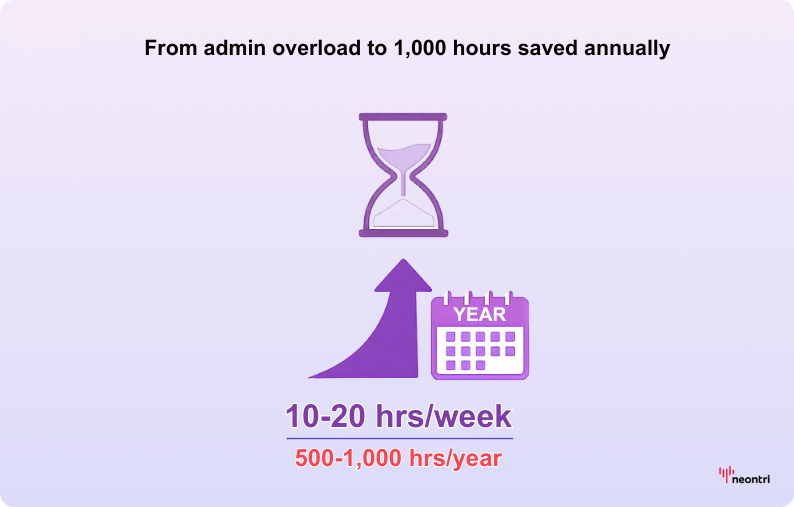
In financial terms, this often means tens of thousands of dollars in recovered productivity. And that’s before factoring in the hidden costs of mistakes: the reduction in human error alone can justify the investment, as correcting manual process errors is both costly and time-consuming.
Benefit #2: Tailored functionality and an enhanced user experience
With custom development, the user experience is designed for end users, whether employees or customers. No unnecessary buttons, confusing menus, or features that don’t apply to your business model. The interface can be as simple or complex as needed, following the team’s mental models rather than forcing them to adapt to generic software paradigms.
Instead of adjusting workflows to the tool, the solution is designed to support them. A sales team can have a one-click proposal generator if that’s what they need most. Customer service representatives can see a unified view of customer interactions across all touchpoints. The result is higher user adoption rates and improved job satisfaction.
For customer-facing applications, this translates into smoother experiences through faster, more intuitive interfaces compared to generic platforms. Companies that deliver superior usability enjoy significantly higher customer retention, as people prefer applications that feel natural and efficient rather than cumbersome and rigid.
With such clear evidence of the value in optimizing processes, companies must then strategically determine the most effective digital experience delivery method for their users.
Benefit #3: Seamless integration and single source of truth
Custom web apps excel at connecting with essential business tools or consolidating several platforms into one unified environment. Off-the-shelf solutions often struggle with this, forcing teams to import and export CSV files manually or rely on incomplete data sync.
With tailored development, companies can build APIs or direct integrations to their existing software ecosystem, covering:
- accounting systems
- CRM platforms
- payment gateways
- inventory management
- marketing tools
The result is data consistency and real-time information flow across the entire operation.
For example, a custom app could automatically pull e-commerce orders into an internal dashboard, then push summary data to your accounting system—no middle-man Excel files needed. This creates a single source of truth where all stakeholders access the same updated information, eliminating confusion and inconsistencies caused by fragmented tools.
Benefit #4: Scalability and flexibility for growth
Built with long-term growth in mind, custom applications can scale to handle rising user numbers, higher transaction volumes, and growing feature complexity. By contrast, off-the-shelf solutions often impose user caps or demand costly enterprise upgrades once usage exceeds certain thresholds.
Flexibility goes beyond technical capacity. Whether expanding to new locations, adding service lines, or shifting the business model, a custom app can evolve to support these changes. Generic software, on the other hand, may lack that adaptability, sometimes forcing a complete platform switch, which is both costly and disruptive.
There’s also freedom from a vendor’s update schedule or feature roadmap. New capabilities can be introduced on the organization’s timeline, ensuring agility in responding to growth and changing competitive pressures.
Benefit #5: Built-in security and long-term operational stability
Compared to off-the-shelf solutions, custom solutions provide superior security control. You manage:
- data storage
- security protocols
- compliance standards
internally rather than relying on third-party software that may expose thousands of clients at once.
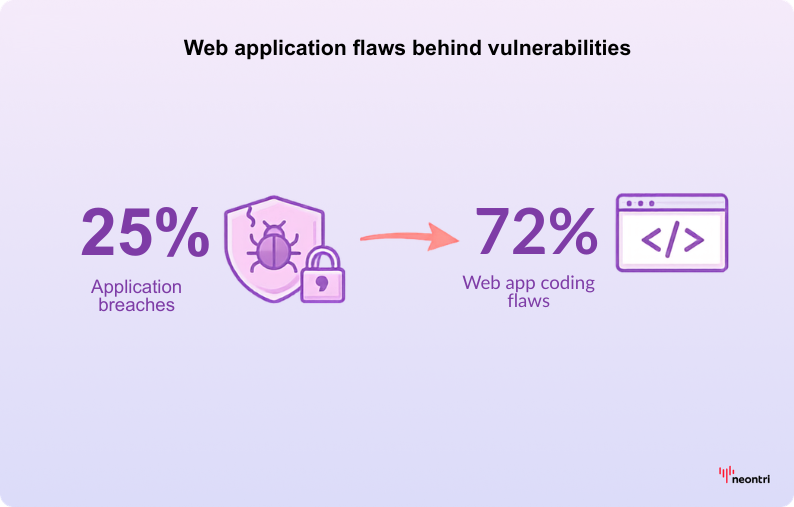
Application breaches account for 25% of all data breaches, and 72% of vulnerabilities stem from flaws in web app coding. However, custom apps present smaller targets for hackers than widely used commercial software, and security gaps can be patched on an organization’s own schedule instead of waiting for vendor fixes.
There’s also full authority over availability and functionality. An app is not subject to vendor downtime, policy changes, or sudden feature removals. While an off-the-shelf tool might alter its interface or discontinue functions without warning, custom applications ensure stability and predictability.
Benefit #6: Cost savings and ROI in the long run
While custom development requires significant upfront investment, the long-term financial benefits often outweigh initial costs through several mechanisms:
- Elimination of recurring licensing fees: Businesses pay substantial monthly or annual fees per user for SaaS platforms. Over several years, these recurring costs can exceed custom development expenses.
- Operational efficiency gains: Time savings from streamlined workflows translate directly to labor cost reductions. If a custom system enables two additional sales per month or removes the need for one full-time administrative role, calculate that annual value impact.
- Competitive revenue advantages: Unique capabilities that competitors lack can drive customer acquisition and retention, generating revenue that wouldn’t be possible with generic tools.
Consider this scenario: Spending $50,000 on a custom system that enables two extra sales per month or cuts out one full-time employee’s worth of manual work could pay for itself within 12-24 months. The return on investment compounds over time as the efficiency gains and competitive advantages continue indefinitely.
Benefit #7: Competitive differentiation through custom software
Custom applications enable features and capabilities that competitors using generic software simply can’t match. This differentiation becomes particularly valuable in saturated markets where service quality and operational efficiency determine success.
A bespoke web portal can set a brand apart in customer service, building loyalty and reducing churn. Efficiency gains also make it possible to offer faster turnaround times, more competitive pricing, or superior service quality. Over time, these advantages compound into sustainable competitive moats.
In today’s technology-driven business environment, leveraging custom software innovation can be the decisive factor against competitors who all use the same off-the-shelf tools. Unique capabilities become part of the brand value proposition you deliver.
Need more reasons to consider custom software at the enterprise level? Explore the key benefits in Advantages of Custom Software: Strategic Decision Framework for Enterprise Leaders.


Eliminate manual processes and boost efficiency
Stop wasting time on disconnected systems and manual workflows. Let Neontri’s expert developers build a custom web application that gives you the competitive edge over competitors stuck with generic tools
Potential challenges and how to mitigate them
Every digital project carries risks, and custom development is no exception. High upfront investment, security concerns, and adoption hurdles can jeopardize success if left unaddressed. The upside is that with the right mitigation strategies, these challenges can be managed effectively, turning potential obstacles into opportunities for long-term stability and growth.
Challenge #1: Upfront cost and time investment
Custom development requires significant planning, skilled development teams, and weeks to months of development time, depending on complexity. Many businesses hesitate due to these initial resource commitments.
Mitigation strategies:
- MVP (Minimum Viable Product) approach: Start with core functionality that delivers immediate value, then expand features in subsequent phases. This reduces initial costs while providing earlier returns on investment.
- Flexible development options: Consider various team structures, including in-house developers, specialized agencies, freelance contractors, or hybrid low-code solutions to match budget constraints and timeline requirements.
- Phased budget planning: Spread development costs across multiple budget cycles by implementing features in logical progression rather than attempting comprehensive builds upfront.
Challenge #2: Connectivity and infrastructure considerations
Like all modern web applications, whether custom-built or off-the-shelf, performance depends on a stable internet connection. Outages or weak infrastructure can cause disruptions, which makes deployment choices and system design critical.
Mitigation approaches:
- Progressive Web App (PWA) capabilities: Service workers and local caching allow offline access to core features, so users can continue working until connectivity is restored.
- Selective offline options: Critical functions can be designed to run locally with data synced once the network is back, similar to how Gmail enables offline email composition.
- Hybrid architecture models: Essential operations can rely on local backups or on-premises infrastructure, while the cloud handles collaboration, scalability, and data sharing.
Challenge #3: Maintenance and updates responsibility
Unlike SaaS platforms, where vendors handle maintenance, custom applications require ongoing attention, including security patches, framework updates, browser compatibility, and feature enhancements.
Management strategies:
- Professional support arrangements: Establish long-term support contracts with development partners or retain in-house technical capabilities to handle ongoing requirements.
- Documentation and knowledge management: Maintain comprehensive system documentation and version control to facilitate smooth transitions and reduce dependence on specific individuals.
- Scheduled maintenance planning: Implement regular review cycles for security updates, performance optimization, and compatibility testing to prevent issues before they impact operations.
Challenge #4: Security risks
Improperly developed custom applications can introduce vulnerabilities, particularly when security best practices aren’t followed throughout the development process.
Security mitigation:
- Professional security expertise: Engage developers experienced with secure coding practices and consider independent security audits for critical applications.
- OWASP compliance: Follow established security guidelines, including safeguards against common threats such as SQL injection, cross-site scripting, and unauthorized access.
- Ongoing security maintenance: Treat security as an ongoing responsibility rather than a one-time consideration, with regular updates and vulnerability assessments.
When implemented correctly, custom applications often provide superior security compared to widely used platforms that present attractive targets for malicious actors.
Challenge #5: Adoption and change management
Internal apps require user adoption and change management, and this becomes even more critical in larger organizations where workflow changes affect multiple departments.
Adoption strategies:
- User-centered design: Involve end-users throughout the design process to ensure the application feels intuitive and addresses their actual needs rather than perceived requirements.
- Training and support: Provide comprehensive training programs and ongoing support to help users transition confidently to new workflows.
- Phased rollout: Implement gradual deployment strategies that allow users to adapt progressively rather than requiring immediate wholesale changes.
Common use cases and examples of custom web apps
Custom web applications serve diverse business needs across industries and organizational functions. Understanding common use cases helps identify opportunities within your own operations and provides realistic expectations for what custom development can achieve.
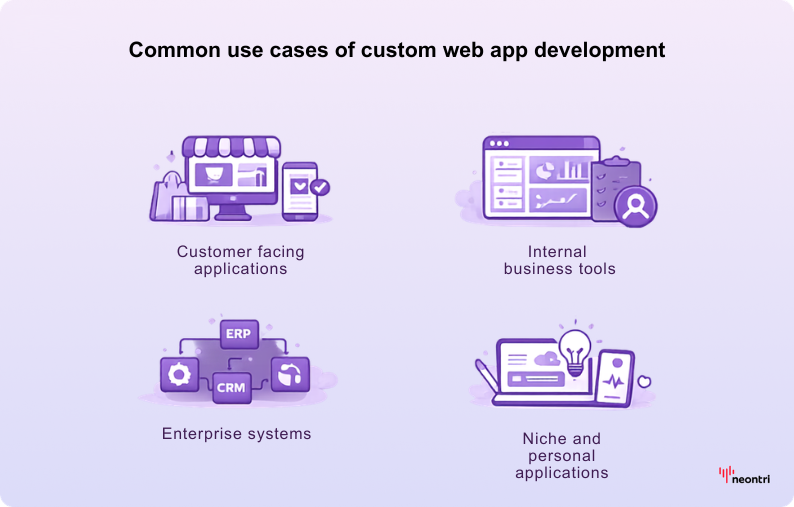
Use case #1: Customer-facing applications (e-commerce and portals)
Online retailers develop custom e-commerce platforms to create unique shopping experiences, often after outgrowing basic tools like Shopify or WooCommerce. Nike’s “By You” platform, for example, lets shoppers design personalized shoes through a sophisticated web application that connects real-time visualization with manufacturing. Also, some brands let users create short UGC clips in the browser or mobile app, using a Flutter-based video editor for fast cross-platform delivery.
Customer portals offer secure, personalized access to account information, order tracking, support tickets, and self-service capabilities. A salon chain might deploy an online booking system that eliminates phone tags and provides 24/7 access to services.
A consulting company could build a tailored portal where clients track project milestones, access deliverables, submit feedback, and manage billing—all while reducing support tickets by 40% and reinforcing a professional brand image.
Use case #2: Internal business tools (dashboards and internal portals)
Companies frequently develop business intelligence dashboards to visualize key performance indicators from multiple systems in unified interfaces. For instance, Amazon’s internal operational dashboards pull data from various systems to provide real-time insights for decision-making.
Internal portals and intranets serve as central hubs where employees access resources, HR tools, announcements, and specialized applications like project management or time-tracking systems tailored to company processes. A construction firm might create a custom project management web app to track site progress because generic tools don’t accommodate their specific field reporting and safety compliance requirements.
These internal applications improve collaboration efficiency and ensure critical information remains accessible to appropriate team members regardless of location or device.
Use case #3: Enterprise systems (ERP, CRM, and specialized systems)
Large organizations often develop or heavily customize enterprise resource planning (ERP) systems to integrate all departments seamlessly. Toyota’s custom ERP system aligns production with demand in real time, reducing waste and improving efficiency across its manufacturing operations.
Customer relationship management (CRM) systems benefit from customization when off-the-shelf solutions like Salesforce prove too generic or expensive. Hostinger developed a custom CRM that improved their Net Promoter Score significantly by tailoring the interface and workflows to their specific customer service processes.
Industry-specific systems address compliance requirements and unique workflows that generic software can’t accommodate. Healthcare organizations build custom applications for patient scheduling and medical records that meet specific privacy regulations, while financial services firms develop platforms that provide competitive differentiation.
Use case #4: Niche and personal applications
Entrepreneurs and smaller organizations also benefit from custom web applications. A travel blogger can create a custom itinerary planner for their audience, or a fitness coach might develop a personalized workout tracking system that integrates with their training methodology.
Modern no-code and low-code platforms make these smaller projects increasingly accessible. This allows individuals and small teams to build custom solutions without extensive programming knowledge.
How to develop a custom web application: Step by step guide
Understanding the development process helps you manage projects effectively, communicate with developers, and make informed decisions throughout the journey. Whether you’re building internally or working with external teams, these steps provide a roadmap for success.
Step #1: Planning and requirements gathering
This phase determines project success more than any other factor. Begin by clearly defining the business problem you’re solving and the specific goals you want to achieve.
Requirements definition process:
- Stakeholder involvement: Include everyone who will use or be affected by the application—end-users, administrators, managers, and technical staff. Their input ensures no critical requirements are overlooked and improves adoption rates.
- Feature prioritization: Distinguish between “must-have” core functionality and “nice-to-have” enhancements. With clear priorities, teams can launch an MVP fast and contain cost and complexity.
- Process documentation: Map current workflows and identify improvement opportunities. Understanding existing processes helps ensure the custom application enhances rather than disrupts productive patterns.
- Success metrics: Define specific, measurable outcomes that will indicate project success. For example, “reduce order processing time by 30%” or “eliminate manual data entry for customer service requests.”
- Technical requirements: Consider compliance obligations, security requirements, integration needs, and scalability expectations early in the planning process.
Neontri’s tip: Create a Product Requirements Document (PRD) or comprehensive feature specification that serves as your project roadmap and helps prevent costly changes during development. Quality planning can prevent expensive modifications later. Businesses that skip thorough requirements gathering often end up redeveloping major portions of their applications.
Step #2: Design and prototyping
Visual design and UX planning prevent costly interface changes during development and ensure the final product meets end-user expectations and business requirements.
Design process components:
- Wireframing and mockups: Create visual representations of application screens before coding begins. Tools like Figma, Sketch, or even hand-drawn sketches help visualize interface layouts and user interaction flows.
- User experience testing: Involve actual end-users in reviewing prototypes to gather feedback while changes are still easy and inexpensive to implement. This user-centered approach prevents building applications that look good but don’t work well for their intended purposes.
- Responsive design planning: Ensure design works effectively across desktop computers, tablets, and mobile devices. If significant portions of your users access the application via mobile devices, consider Progressive Web App (PWA) approaches that provide app-like mobile experiences.
- Brand integration: Custom applications provide opportunities to reinforce a brand identity through consistent use of logos, colors, and design elements that align with your other customer touchpoints.
Prototyping outcomes:
Complete this phase with clickable prototypes or comprehensive design specifications that developers can follow accurately. Clear design documentation reduces development time and prevents misunderstandings that lead to revision cycles.
Once the design and user experience are clear, it’s easier to choose a technology stack that supports those requirements and delivers the desired performance.
Step #3: Choosing the right tech stack (and approach)
Technology selection impacts long-term success, maintenance costs, and scalability potential. Your choices should align with project requirements, team capabilities, and growth expectations.
Frontend and backend considerations:
Modern web applications consist of frontend components (user interface) and backend systems (data processing and storage). Each requires specific technology decisions that affect performance, maintainability, and development costs.
Popular technology combinations:
Successful apps use JavaScript frameworks like React or Angular for frontend development, connected to backend systems running Node.js, Python (Django/Flask), Ruby on Rails, or PHP (Laravel). According to developer surveys, Node.js and React are among the most widely used technologies for web applications, ensuring large community support and available expertise.
Framework selection factors:
Choose technologies based on specific project needs rather than criteria like being popular or easy frameworks. Python excels for apps requiring machine learning integration. Node.js handles real-time features like chat or live updates, whereas PHP provides cost-effective solutions for content-heavy applications.
Development approach options:
- Traditional development offers maximum flexibility and customization but requires skilled developers and longer timelines.
- Low-code/no-code platforms enable faster development for simpler applications but limit customization and scalability options. These platforms work well for basic workflow automation and internal tools, but may not support complex business logic or high-traffic systems.
Budget and timeline considerations:
Technology decisions directly impact custom software development costs. Open-source frameworks reduce licensing expenses, while popular technology stacks provide larger talent pools and potentially lower developer costs.
If you’re working with development partners, they will recommend the right technology stacks based on your needs; understanding these options also helps you make informed decisions and ask relevant questions during the selection process.


Turn your vision into reality faster
App development can feel overwhelming with so many technical decisions. Skip the learning curve and partner with Neontri’s experts to bring your custom app to life efficiently while focusing on growing a business.

Step #4: Development and testing
Coding begins based on chosen tech stacks and approved designs. Successful development projects use iterative approaches that provide regular progress visibility and opportunities for course correction.
Development methodology:
- Agile/iterative approach: Break development into focused sprint periods, typically 2-4 weeks, each delivering specific functionality. This way you can see progress regularly and provide feedback that guides subsequent development phases.
- Version control: Use Git or similar systems from project initiation. Version control enables multiple developers to collaborate effectively while providing safety nets for rolling back problematic changes.
Testing integration:
- Multiple testing levels: Implement unit tests (individual function verification), integration checks (component interaction), and user acceptance (real-world scenarios).
- Staging environments: Set up pre-production servers that mirror live systems for safe QA without affecting operations.
- Security testing: Include security verification throughout development rather than treating it as a final step. Check input validation, access controls, and data encryption to prevent vulnerabilities.
Quality assurance:
- Bug tracking systems: Use tools like Jira, Trello, or specialized platforms to document issues systematically and track resolution progress.
- Stakeholder involvement: Run regular sprint demos or showcase sessions where stakeholders can review working features, validate progress, and flag issues early. Their feedback doubles as a user acceptance step, ensuring alignment with business needs.
Testing typically accounts for 25-30% of development time, which is normal and necessary for delivering reliable applications. Rigorous QA and stakeholder involvement prevent post-launch issues that could disrupt operations or erode user confidence.
Step #5: Deployment (launching an app)
Moving from development environments to live production systems demands careful planning and execution to ensure smooth launches and reliable ongoing operations.
Hosting and infrastructure:
- Platform selection: Choose hosting solutions that match scalability needs and technical expertise. Cloud platforms like AWS and Azure provide extensive capabilities but call for technical management, while Platform-as-a-Service options such as Heroku offer simplicity for smaller applications.
- Domain and security setup: Secure appropriate domain names and implement SSL certificates for encrypted communication. Modern web apps require HTTPS for security and search engine optimization.
Launch strategy:
- Soft launch approaches: Deploy to limited user groups initially to identify any server-related issues or performance bottlenecks under real usage conditions.
- Monitoring implementation: Set up systems to track application uptime, error rates, and usage patterns. This monitoring enables rapid response to any issues that emerge after launch.
- Performance optimization: Monitor application response times and server resource utilization to ensure good user experiences as usage grows.
Step #6: Maintenance and continuous improvement
Post-launch activities ensure a custom application remains secure, functional, and valuable as businesses evolves and technology landscapes change.
Ongoing maintenance requirements:
- Bug resolution: Address issues that users discover during normal operations. Maintain systems for tracking, prioritizing, and resolving problems systematically.
- Security updates: Apply patches for frameworks, libraries, and server software promptly when security vulnerabilities are announced. Schedule regular security reviews and updates.
- Feature evolution: Plan for adding new capabilities as business needs change. The advantage of custom development is the ability to enhance apps continuously rather than being limited by vendor roadmaps.
- Performance monitoring: Track application performance as user counts and data volumes grow. Optimize code and upgrade infrastructure proactively to maintain good user experiences.
Documentation and knowledge management:
Maintain up-to-date documentation about application functionality, administrative procedures, and technical specifications. Good documentation facilitates team transitions and simplifies future enhancement projects.
Consider implementing DevOps practices like automated deployment and backup systems to reduce manual maintenance overhead and improve reliability.
Allocate appropriate resources for ongoing maintenance—typically 15-20% of initial development costs annually. This investment keeps a custom application valuable and competitive over time.
Best practices and tips for success
Even the best technology can fail without the right approach. Following proven best practices helps avoid costly mistakes, ensures smoother development, and sets your custom web app up for long-term success.
| Best practices | Details | Tips for success |
|---|---|---|
| Involve users early and often | Engage actual end-users throughout the development process through interviews, prototype testing, and feedback sessions. This user-centered approach ensures applications truly meet needs rather than perceived requirements while boosting adoption rates. | Common mistake to avoid: Developing in isolation and discovering after launch that the application doesn’t match user workflows or expectations. |
| Don’t over-engineer (start small) | Resist the temptation to build comprehensive systems with every possible feature immediately. Start with MVP functionality that delivers core value, then iterate based on user feedback and changing requirements. | Scope management: Lock down feature scope for each development phase to prevent “scope creep” that leads to budget overruns and delayed launches. |
| Prioritize security from day one | Security considerations are much more expensive to address after development completion. Implement secure coding practices, input validation, data encryption, and strong authentication from project initiation. For applications handling sensitive data, it’s also worth adding two-factor authentication (2FA) to provide an extra layer of protection. | Security best practices: Use established frameworks with built-in security features. Follow OWASP guidelines for preventing common vulnerabilities like SQL injection and cross-site scripting. Avoid security mistakes: Never use default passwords, always validate user inputs, and encrypt sensitive data both in transit and at rest. |
| Ensure performance and scalability | Design for performance early rather than attempting optimization after problems emerge. Consider database design, efficient coding practices, caching strategies, and scalable architecture patterns. | Performance testing: Load test applications with realistic data volumes and user counts before launch to identify bottlenecks. Scalability planning: Build systems that can accommodate growth through additional servers, database optimization, or architectural enhancements. |
| Maintain good documentation | Document code functionality, deployment procedures, administrative processes, and user guides. Quality documentation facilitates maintenance, team transitions, and future enhancements. | Documentation benefits: Reduces dependence on individual developers, simplifies onboarding new team members, and prevents knowledge loss during personnel changes. |
| Plan for training and change management | Successful application deployment requires user adoption strategies, including training programs, help documentation, and gradual rollout approaches. | Change management: Get stakeholder buy-in by demonstrating benefits and providing adequate support during transition periods. Users may resist changes initially, so make learning new systems as easy as possible. |
Future trends in custom web application development
Understanding emerging trends helps you make forward-looking decisions that keep your custom app relevant and competitive as technology evolves.
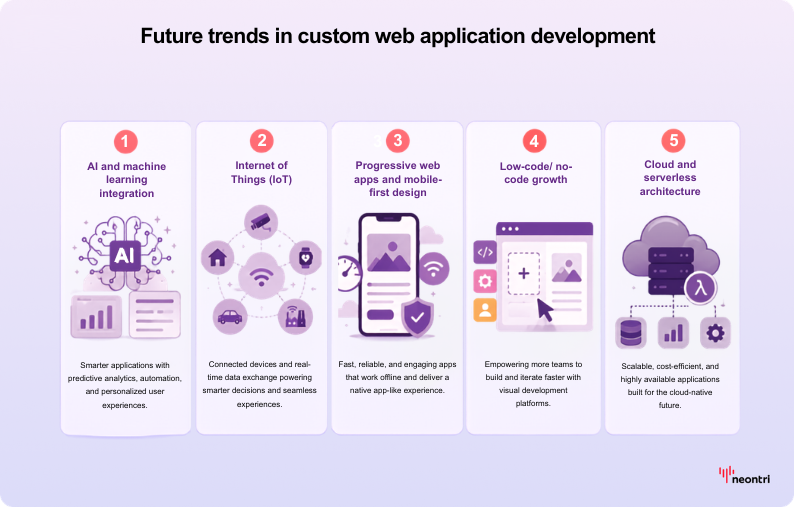
Trend #1: AI and machine learning integration
More custom applications incorporate artificial intelligence for enhanced functionality, including chatbots for customer support, predictive analytics in business dashboards, and personalization algorithms for improved user experiences.
Implementation approaches: Applications integrate AI through cloud services and APIs rather than building machine learning capabilities from scratch. This makes advanced features accessible to smaller development projects.
Competitive advantages: AI-enhanced applications can provide significant differentiation. For example, a custom CRM might include lead scoring algorithms or automated follow-up recommendations that improve sales effectiveness.
Trend #2: Internet of Things (IoT)
Web applications increasingly serve as control panels and data visualization tools for IoT device ecosystems. Factory management systems display real-time sensor data, while smart building apps control environmental systems through web interfaces.
Development considerations: IoT integration needs real-time data processing and APIs designed for device communication. Plan for these requirements if your business uses or anticipates using connected devices.
Trend #3: Progressive web apps and mobile-first design
Progressive Web App (PWA) technology enables web applications that behave like native mobile apps, including offline functionality, push notifications, and home screen installation options.
Mobile trends: With increasing mobile usage, responsive design is now standard rather than optional. PWA capabilities provide competitive advantages for applications where mobile access is important.
Trend #4: Low-code/no-code growth
Development platforms that require minimal coding continue improving in capability and adoption. Gartner projects that by 2025, 70% of new applications developed by enterprises will use low-code or no-code technologies for at least some components.
Citizen development: More business users are building applications independently, which means professional developers can focus on complex core systems while simpler tools are handled through low-code platforms.
Strategic implications: Monitor low-code tools for simpler internal needs while directing custom development resources toward areas that deliver maximum competitive advantage.
Trend #5: Cloud and serverless architecture
Modern applications increasingly use serverless computing and microservices architectures that automatically scale based on demand while reducing infrastructure management overhead.
Serverless benefits: Pay only for actual usage rather than maintaining servers continuously. Automatic scaling handles traffic spikes without manual intervention.
Microservices advantages: Breaking applications into small, independent services enables easier updates, better fault isolation, and more flexible scaling strategies.
Staying aware of these trends helps ensure your custom applications remain modern and competitive. When planning development projects, consider whether any emerging technologies align with your business vision or strategic roadmap.
Conclusion: Empower your business with custom solutions
Custom web application development might seem like a complex journey, but it offers unparalleled rewards, from streamlining operations and delighting customers to creating sustainable competitive advantages. With proper planning, the right development approach, and commitment to best practices, custom apps become powerful business assets that grow with your organization.
From MVPs to enterprise systems, the goal is software that serves your vision instead of forcing compromise. Emerging trends like AI and IoT make it possible to future-proof operations and outpace competitors still tied to generic tools. With market growth projected at 22.6% annually through 2030, the value of custom development is clear.
The next step is yours—whether it’s defining key features, solving current pain points, or engaging experts to bring your vision to life.
FAQ
How long does it take to develop a custom web app?
A basic app may take 2–3 months, mid-sized projects 4–6 months, and large enterprise builds longer. Sometimes companies release an MVP in about 3 months, then expand based on feedback and business needs. Read more about timelines in the article Software Development Timelines: How to Plan, Predict, and Deliver with Confidence
How much does a custom web application cost?
Costs vary widely depending on scope, with factors such as: feature complexity, design requirements, user volume, team expertise, and system integrations all playing a role. Beyond initial development, ongoing expenses typically include hosting, updates, and technical support.
Rather than treating it as a one-time expense, a custom web app should be seen as a strategic investment that drives long-term efficiency, reduces reliance on licensing fees, and builds sustainable competitive advantage.
Do I need to hire developers to build a custom web app, or can I do it myself?
Non-developers can build simpler apps using no-code/low-code platforms like Bubble, Microsoft Power Apps, or OutSystems, which provide visual environments without programming knowledge. Those with technical skills can also create basic apps with open-source frameworks supported by tutorials.
For more complex applications—those requiring strong security, scalability, or advanced features—experienced developers or agencies are typically necessary to ensure proper architecture and long-term reliability. A practical approach is to validate your idea with no-code/low-code tools, then hire expert web developers to expand or refine the solution as requirements grow.
Are custom web applications secure?
Yes. They can be highly secure when designed and maintained properly. Unlike generic software, custom apps give you full control over data storage, encryption, compliance measures, and access management, while also presenting a smaller target for attackers.
Security still requires ongoing responsibility: following secure coding practices, keeping frameworks updated, running regular audits and penetration tests, and maintaining reliable backups. With these measures in place, and developers experienced in security, custom applications can meet even the strictest industry standards in sectors like banking or healthcare.
What if my needs change? Can my custom app evolve?
Adaptability is one of custom development’s biggest advantages. With full ownership of the code, features can be enhanced or added as business needs shift. Modular design, phased development, and regular updates allow the app to scale over time.
Planning for growth from the start, using scalable technologies and architecture, ensures smooth evolution without costly rebuilds. This flexibility contrasts sharply with off-the-shelf tools that restrict you to vendor roadmaps and update schedules.
Which industries benefit most from custom web apps?
Custom web applications deliver the most value in sectors with complex workflows, strict compliance needs, or the need for differentiation. Examples include:
- Healthcare: Patient portals, appointment systems, and medical records with HIPAA compliance.
- Manufacturing: Supply chain, quality control, and production scheduling tools.
- Financial services: Trading platforms, risk management, and secure customer portals.
- Education: Learning management systems and student information portals.
- Professional services: Client portals, project management, and billing systems.
In general, organizations with unique processes or regulatory requirements benefit most from tailored solutions.