
Every growing business eventually hits the same software wall. Multiple apps, scattered spreadsheets, and still, critical features are missing. It’s a common story: 89% of enterprises report major gaps in their off-the-shelf software solutions. No surprise, then, that custom application development is growing faster than ever. It offers the solution to break free from the limitations of generic software.
Custom application development delivers exactly what’s needed – built around specific workflows and goals, not the other way around. Unlike one-size-fits-all solutions that force companies to adapt their processes, it adapts seamlessly to the way a business actually operates.
At Neontri, we’ve helped hundreds of companies move from software frustration to tailored success. Drawing on this experience, our team created a comprehensive guide that covers every stage of the process – from assessing needs and defining requirements to development and long-term optimization. It offers a clear roadmap for turning software challenges into a lasting competitive advantage.
Key takeaways:
- Custom applications solve specific business problems as they’re built around unique workflows and requirements, not generic features designed for thousands of companies.
- Most custom applications achieve ROI within 12-24 months.
- Low-code platforms have democratized custom development by making tailored solutions accessible to businesses without large technical teams or multimillion-dollar budgets.
- Starting with an MVP delivers value faster, as focusing on core features first allows teams to iterate based on real user feedback rather than building everything at once.
- Security and maintenance require upfront planning since ongoing updates, patches, and enhancements are essential to protect investment.
What is custom application development?
Custom application development is the process of designing, building, and deploying software specifically tailored to the needs of a particular user, team, or organization. This approach creates one-of-a-kind systems engineered to solve specific business challenges, unlike generic solutions that serve thousands of companies with identical features.
Companies typically pursue custom application development when they encounter specific trigger points:
- outgrowing existing tools that can’t scale with their expansion
- need for competitive differentiation through technology
- existing solutions require complex integrations between multiple systems
- compliance requirements that generic solutions can’t address adequately.
Off-the-shelf vs custom: Understanding the critical difference
Where off-the-shelf software takes a one-size-fits-all approach designed for mass appeal, tailored solutions are built around how a specific organization actually works. Instead of adjusting processes to fit a generic CRM used by thousands of companies, a custom app mirrors an organization’s exact sales workflow, incorporating its terminology, approval processes, and integration needs with precision that no off-the-shelf solution can adequately address.
According to Grand View Research, the global custom software development market is expected to reach USD 146.18 billion by 2030, growing at a CAGR of 22.6%. As demand rises, more companies are turning to custom application development services to build technology around their own processes, priorities, and growth plans instead of adapting their business to rigid off-the-shelf systems.
The landscape has also changed dramatically with the rise of low-code and no-code platforms, making custom application development more accessible than ever. Businesses no longer need large technical teams or multimillion-dollar budgets to create tailored solutions. With these modern platforms, teams can prototype, build, and deploy custom applications in a fraction of the time, combining flexibility with cost efficiency.
Build vs Buy: How to choose the best technology strategy
Building software in-house offers complete control, customization, and alignment with unique business processes—but it also requires significant time, expertise, and ongoing maintenance. Finding the right talent for custom projects can be challenging, so having a clear plan to hire skilled app developers is key to success.
Buying off-the-shelf solutions, on the other hand, provides speed and proven reliability but often at the expense of adaptability and differentiation.
According to a Forrester report, 67% of failed software implementations stem from incorrect build vs buy decisions, highlighting the importance of choosing the right approach from the start.
Let’s examine when each option makes strategic sense and go through a framework for making this decision confidently.
| Factor | Custom application | Off-the-shelf solution |
|---|---|---|
| Flexibility | Fully customizable to exact requirements | Configurable within predetermined limits |
| Initial cost | Higher upfront investment | Lower initial cost |
| Long-term cost | Lower ongoing costs, no per-user fees | Escalating subscription and licensing fees |
| Implementation time | 3-12 months depending on complexity | Immediate deployment |
| Maintenance | Internal teams control updates and improvements | Vendor-controlled updates and changes |
| Security | Tailored to the company’s specific security needs | Broad security model, shared with all users |
| Integration | Built to integrate seamlessly with existing systems | Limited integration options, often costly |
| Competitive advantage | Unique capabilities competitors can’t buy | Same tools available to all clients |
| User experience | Designed for your specific users and workflows | Generic interface requiring extensive training |
| Scalability | Scales with your business without penalty | Often limited by user tiers and feature restrictions |
When custom development wins
Custom applications deliver exceptional value when software serves as a strategic asset rather than a simple utility tool. They enable organizations to design systems that directly support their business goals and evolving needs. They’re especially impactful when operational processes drive competitive advantage, when seamless integration and unified data are essential, or when rapid growth is likely to outpace the limits of generic solutions. Read more in the article Advantages of Custom Software: Strategic Decision Framework for Enterprise Leaders
Consider such an example: a mid-sized consulting firm exploring different project management tools. The team tested three off-the-shelf solutions, but each failed to meet the specialized client reporting and complex resource allocation needs. After calculating the hours wasted on workarounds and manual processes, the firm realized that investing in a custom-built system would pay off within 18 months. Moreover, it would provide capabilities that can differentiate them from competitors who use generic tools.
When off-the-shelf makes strategic sense
Custom development isn’t always the answer, and recognizing when off-the-shelf solutions work best demonstrates strategic thinking. Generic solutions excel when business needs align with standard industry practices, rapid deployment is a priority, budgets are tight, functionality gaps are minor, or the use case is short-term or transitional.
If a tool satisfies around 90% of requirements and can adapt to accommodate the remaining 10%, purchasing often proves more efficient than building. The key lies in conducting an honest evaluation of specific needs against established industry norms.
Where off-the-shelf solutions fall short
Generic software solutions often create more problems than they solve for growing businesses. That familiar frustration – “I wish this software just did X” – is a telltale sign that standard tools are limiting efficiency, consuming time, and eroding competitive advantage. Common pain points include:
- rigid workflows that don’t align with established processes
- limited integration options that create data silos
- escalating per-user fees that penalize growth
- forced updates that disrupt daily operations
- generic interfaces that demand extra training and constant workarounds.
Decision framework: When to build custom applications
Here is a comprehensive checklist to evaluate whether custom development makes sense for your specific situation.
| Process uniqueness assessment | Do you have unique processes that no available software adequately supports?Are you using numerous spreadsheets, add-ons, or workarounds to compensate for software limitations?Do your workflows require specific steps or data flows that generic software can’t accommodate? |
| Integration and data requirements | Do off-the-shelf solutions lack critical integrations with your existing tools?Are you manually moving data between multiple systems daily?Do you need real-time data synchronization across different platforms? |
| Competitive and growth factors | Do you need technology as a competitive differentiator in your market?Are you hitting user limits or pricing tiers with current software?Will your processes fundamentally change as you scale operations? |
| Compliance and security needs | Do you have security or compliance requirements that generic apps can’t meet?Do you need specific audit trails or data governance features?Are there regulatory requirements unique to your industry or region? |
If you’re answering “yes” to several of these questions, building a custom application might be your best strategic move.
The transformative benefits of custom applications
The benefits of custom software extend far beyond simple feature matching or replacing off-the-shelf tools. Designed around an organization’s unique processes, goals, and challenges, tailored applications enable businesses to streamline operations, boost productivity, and gain a competitive edge. By aligning technology directly with business strategy, they not only enhance efficiency and integration but also unlock new opportunities for innovation and long-term growth.
Efficiency and productivity gains
Custom applications deliver automation and optimized workflows that generic software simply cannot match. For example, a manufacturing company built a custom production scheduling app linked directly to their factory machines, improving production efficiency by 23% compared to their previous off-the-shelf MES system. The application eliminated manual data entry and provided real-time visibility into production bottlenecks.
The impact can be substantial: automating just ten hours of manual tasks per week equates to 520 hours saved per employee annually. This time can be redirected toward higher-value activities that drive business growth.
Unlimited scalability
Well-designed custom applications scale effortlessly as a business expands, accommodating additional users, features, and data capacity without the exponential licensing costs typical of off-the-shelf solutions.
Startups and growing enterprises often face user limits or pricing tiers that constrain progress just as momentum builds. To learn how tailored solutions can support scalable growth, read our article Custom Software Development for Startups.
According to Gartner, 75% of new enterprise applications will use low-code and no-code platforms by the end of 2026, making custom solutions more attainable while offering the scalability needed for sustained growth. Custom applications can be architected from day one to handle future expansion, with planned upgrade paths that don’t require wholesale system changes.
A single source of truth
Custom applications excel at unifying processes scattered across multiple tools, creating the single source of truth that modern businesses require. Instead of copying data between CRM, ERP, accounting software, and spreadsheets, a custom solution integrates with all these databases to centralize information. This integration eliminates data silos, reduces errors, and provides real-time visibility across the entire operation.
Enhanced security
Security can be tailored precisely to organizational needs, including integration with single sign-on systems, custom user permissions aligned with internal structures, and compliance with industry standards built in from the start. Unlike off-the-shelf software, which relies on the vendor’s security model, custom applications provide complete control over data protection.
According to IBM’s Cost of a Data Breach Report, the global average cost of a data breach reached $4.88 million, a 10% increase from the previous year. Custom applications can implement specific security policies and compliance requirements without compromise, particularly crucial for industries with strict regulatory requirements like healthcare, finance, and government
Competitive advantage
Custom applications create unique capabilities that competitors simply cannot purchase off the shelf. For example, Domino’s Pizza attributed a major boost in sales to its custom online ordering app, which provided features and user experience that generic food service software couldn’t match. Netflix’s entire business model was enabled by custom-developed streaming software that didn’t exist in the marketplace when they launched.
While most business needs may be less transformative, custom applications can still deliver operational advantages that differentiate an organization from others relying on the same standard tools. These proprietary systems become durable competitive moats that are difficult to replicate.


Turn technology into a strategic asset
Partner with Neontri to create solutions that drive growth, streamline operations, and give your organization a lasting competitive advantage.
Complete ownership
Custom development grants full ownership of intellectual property and independence from external vendors. There are no unexpected subscription increases, feature removals, or product discontinuations dictated by third parties. Control over the roadmap, data, and future enhancements remains entirely within the organization, ensuring long-term stability and flexibility.
Use cases: Where custom applications shine
Custom applications demonstrate measurable value across nearly every industry and business function, from operations and logistics to customer engagement and analytics. They enable organizations to address unique challenges, streamline processes, and create technology perfectly aligned with business objectives. The following examples illustrate some of the most common scenarios in which businesses achieve transformational outcomes through custom solutions.
Process automation
Some of the most impactful custom applications are designed for internal use, automating workflows that generic software cannot effectively handle. In manufacturing, for instance, companies often build custom production scheduling systems that integrate directly with factory equipment, inventory management, and quality control processes. One automotive parts manufacturer developed a tailored scheduling application that reduced planning time from four hours to just 15 minutes, improving on-time delivery rates by 31%.
Professional services firms build custom project management and resource allocation tools that match their specific methodologies and client requirements. Unlike generic project management software, these applications incorporate industry-specific workflows, custom reporting requirements, and unique billing structures that directly impact profitability.
Customer-facing applications
Custom customer-facing applications enable organizations to differentiate their brand while delivering user experiences precisely aligned with their customer journey and business model. In retail, for example, companies often develop bespoke mobile apps that integrate loyalty programs, personalized recommendations, and seamless purchasing processes. These branded experiences go far beyond what generic e-commerce platforms can offer, resulting in stronger customer engagement, higher retention rates, and increased average order values.
In the financial sector, tailored customer apps also yield measurable results. A regional bank’s custom mobile platform incorporated features specific to local regulations and customer preferences, achieving a 52% higher adoption rate than standard banking applications and reducing customer service calls by 28%.
Industry-specific solutions
Certain industries require custom-built applications due to distinctive regulatory environments, specialized workflows, and complex integration needs that off-the-shelf software cannot adequately address. For example, insurance companies develop specialized underwriting systems, claims management platforms, and customer service tools that incorporate proprietary risk models and automation. A regional insurer’s custom underwriting system reduced approval times by 62% while improving risk assessment accuracy, demonstrating how tailored technology can significantly enhance both efficiency and precision.
In financial services, custom trading platforms, risk management systems, and algorithmic analysis tools provide firms with proprietary capabilities and competitive advantages. One hedge fund’s risk analysis application, powered by in-house algorithms, enabled faster decision-making during volatile market conditions – an edge unattainable with standard solutions.
Data and reporting
Custom business intelligence and data integration platforms solve one of the most persistent challenges for growing organizations: fragmented data spread across multiple systems that hinders effective decision-making. By consolidating information into a single, coherent environment, these applications empower leaders to make timely, data-driven choices.
Sales teams, for instance, often develop custom analytics dashboards that merge CRM data, marketing automation metrics, financial performance indicators, and external market data into unified reporting interfaces. These dashboards deliver real-time insights that would otherwise require hours of manual data compilation with generic BI tools.
Similarly, operations departments develop custom performance-monitoring applications that track KPIs across multiple systems, departments, and locations. Unlike off-the-shelf dashboards that demand extensive configuration and maintenance, tailored solutions display data exactly as decision-makers need to view it – clear, contextual, and actionable.
The custom application development process: Step-by-step roadmap
Delivering an effective custom application requires more than coding – it demands a structured, disciplined approach that aligns technology with real business needs. A well-defined methodology ensures the project stays on track, meets stakeholder expectations, and generates tangible value.
The following framework outlines a proven process for successful custom application development.
Step #1: Define goals and requirements
The foundation of every successful custom application lies in careful planning and requirements gathering. This stage determines whether the outcome will deliver transformational value or become an expensive lesson.
The process begins by bringing together all relevant stakeholders – end users, department leads, IT teams, and executive sponsors. Each contributes essential insights that shape the solution’s priorities and functionality. A detailed list of mandatory features, desired enhancements, and non-negotiable constraints should be compiled to guide development efforts.
The focus should remain on understanding the underlying problem before defining the solution. Key questions include:
- What pain points must the application address?
- Who will interact with it daily?
- Which processes need to evolve, and which should remain intact?
- How will success be measured six months post-launch?
Thorough documentation is essential. This includes workflow diagrams of current and future processes, user stories describing how various roles engage with the system, and clear, quantifiable objectives, such as “reducing order processing time by 50%” or “eliminating manual data transfer between platforms”.
Step #2: Decide on development approach
Once requirements are clearly defined, the next step is selecting the development approach that aligns with available resources, technical capabilities, and long-term strategy. Each option presents unique advantages and trade-offs that should be weighed carefully to ensure the best outcome.
- In-house development works best when strong engineering talent already exists within the organization and the project aligns closely with core business competencies. This approach offers full control over every aspect of the process – timelines, priorities, and the final product. However, it demands significant internal resources and may slow other strategic technology initiatives.
- Outsourcing brings specialized skills, proven methodologies, and additional capacity. Partnering with experienced developers enables internal teams to stay focused on core business operations while ensuring high-quality execution, especially for projects involving complex integrations, emerging technologies, or advanced functionality.
- Low-code/no-code platforms enable rapid application development with minimal coding, democratizing the creation of custom software for organizations without large technical teams. These platforms accelerate delivery, reduce costs, and support iterative innovation.
Many successful projects blend multiple approaches. For instance, low-code tools might be used for rapid prototyping and interface design, while professional developers handle complex integrations or enterprise-grade features –balancing speed with technical robustness.
Step #3: Design the application
User experience design determines whether your custom application becomes an efficiency-enhancing tool that users love or an expensive system that sits unused. This phase transforms documented requirements into intuitive, efficient interfaces that support real-world workflows.
Begin with low-fidelity wireframes created with simple tools like Figma, Miro, or even pen and paper. Focus on layout, navigation flow, and core functionality rather than visual aesthetics. These wireframes should illustrate how users will move through the application to complete their primary tasks efficiently and intuitively.
Involve actual end-users extensively during design. Conduct review sessions with potential users to gather feedback, review wireframes, and suggest improvements. These sessions often reveal pain points, missing functionality, or confusing navigation that might otherwise go unnoticed.
Next, build interactive prototypes that mimic application behavior without requiring full development. Modern prototyping and low-code tools can produce clickable demos, helping stakeholders visualize the end product and validate key decisions before coding begins. This step bridges the gap between concept and implementation, ensuring alignment across design, development, and business goals.
Step #4: Develop the application
The development phase transforms carefully planned designs and requirements into a fully functional product. Whether development is handled internally, through an external partner, or on a low-code platform, following proven project management methodologies significantly improves success rates.
An agile development methodology offers the most flexibility and control. By delivering working software in short, iterative cycles rather than attempting to build everything at once, teams can gather continuous feedback, make timely adjustments, and catch potential issues early. Development should be organized into two- to four-week sprints, with each sprint producing tangible functionality for stakeholders to review and test.
It’s best to build applications on a modular architecture that separates features into independent components. This structure simplifies updates and maintenance, enhances scalability, and minimizes the risk that changes in one area will affect other parts of the system.
Moreover, according to McKinsey research, AI-assisted software development can significantly accelerate delivery by automating repetitive tasks such as code generation, testing, and documentation. Many organizations are already leveraging GenAI tools to streamline development workflows and shorten time-to-market.


Turn your vision into reality faster
App development can feel overwhelming. Skip the learning curve and partner with Neontri’s experts to bring your custom app to life efficiently.

Step #5: Test the application thoroughly
Comprehensive testing is what separates reliable, high-performing custom applications from costly failures. A structured, multi-layered testing process ensures the product functions as intended, performs under real-world conditions, and maintains strong security standards.
Begin with unit testing to confirm individual components work correctly in isolation. Follow with integration testing to verify that modules communicate and operate together as expected. Then conduct user acceptance testing (UAT), where real users interact with the system using realistic data and workflows to validate usability and functionality before deployment.
Security testing is a top priority, especially for applications handling confidential business or customer information. Perform detailed vulnerability assessments to identify and mitigate potential risks. For systems managing financial or personal data, engaging independent security specialists helps ensure compliance and protection against breaches.
Finally, execute performance testing to validate that the application can sustain expected user loads and data volumes without compromising response times or system stability. Simulate realistic conditions to uncover bottlenecks and optimize performance before the system goes live.
Step #6: Deployment and launch
Successful deployment requires careful planning and coordination to minimize business disruption. The goal is to ensure all users can access and operate the new system effectively from day one.
Begin by preparing the production environment with the correct server configurations, database setup, security certificates, and backup systems. For cloud-based deployments, confirm that adequate computing resources, autoscaling settings, and failover mechanisms are in place. Conduct a full round of testing within this live environment before migrating data or retiring legacy systems.
Plan a staged rollout strategy rather than deploying to all users simultaneously. Start with a pilot group or single department to validate real-world performance and identify production-specific issues before broad adoption.
Establish clear support procedures for launch day and the first few weeks of operation. Ensure technical teams are readily available to address user questions and resolve any issues quickly. Closely monitor performance metrics, such as uptime, response times, and error rates, during the early weeks to detect and address problems before they affect productivity.
Step #7: Monitor, iterate, and maintain
Post-launch is not the end of the project – it’s the beginning of the application’s lifecycle. Continuous monitoring, user feedback, and regular updates ensure the solution remains secure, efficient, and aligned with evolving business goals. Unlike off-the-shelf software, where you’re dependent on vendor updates, custom applications can be continuously improved based on actual usage and feedback.
Implement monitoring tools to track application performance, user adoption, and system reliability. Monitor key metrics like response times, error rates, and user activity levels to identify potential issues before they impact productivity. Set up automated alerts to flag critical problems that require immediate attention.
Collect user feedback through structured surveys, feedback forms, and periodic review sessions. Real-world users often identify workflow improvements, usability enhancements, or new features that can drive further efficiency once the system is in regular use.
Plan for ongoing maintenance that includes applying security patches, optimizing and management of application performance, and resolving defects. Schedule quarterly or semi-annual evaluations to review application health, assess evolving requirements, and plan iterative updates based on business growth and changing requirements.
Best practices for successful custom development
Adhering to proven best practices greatly increases the likelihood of success in any custom development initiative. By following tested methodologies and emphasizing collaboration between business and technical teams, organizations can transform complex requirements into reliable, scalable, and user-friendly solutions that drive measurable results.
The principles highlighted in this section are drawn from the collective experience of hundreds of successful implementations across industries and organization sizes.
Involve end-users early and often
The most successful custom applications result from extensive collaboration with the people who will actually use the system daily. These users understand workflow nuances, identify missing or best features, and provide crucial insights that developers and managers might overlook due to their distance from day-to-day operations.
Try to engage users at every stage of the development process, from requirements gathering and design reviews to prototype and user acceptance testing. Their input prevents building technically sound applications that nobody wants to use. Moreover, users who participate in development become champions who help drive adoption across their teams.
Launch lean: Build the 80% MVP first
Resist the temptation to build every conceivable feature in the initial release. Instead, identify the core functionality that covers 80% of the expected value and implement those features first. This Minimum Viable Product (MVP) approach delivers a usable application faster while providing a foundation for future enhancements based on actual usage patterns.
The MVP strategy allows you to start capturing benefits immediately while learning how users actually interact with the system. These insights guide subsequent development phases and often reveal that some planned features aren’t actually needed, saving time and resources for more valuable capabilities.
Stay flexible: Build in sprints and learn fast
Agile development methodologies significantly improve the success rates of custom applications by integrating flexibility and feedback into the development process. Rather than following rigid requirements determined months in advance, agile approaches adapt to changing needs and new insights discovered during development.
Plan development in short sprints that deliver working functionality every few weeks. This approach allows stakeholders to see progress, test features, and provide feedback before substantial additional development occurs. Problems identified early are much cheaper and easier to fix than issues discovered after completion.
Drive adoption: Train users for a confident launch
Even the most intuitive applications require a proper introduction to achieve high adoption rates. Plan comprehensive training programs that address different learning styles and technical comfort levels among your user base, recognizing that change can be challenging, even with the benefits it offers.
Create multiple training resources, including written procedures, video tutorials, hands-on sessions, and quick reference guides. Some users prefer self-paced learning while others benefit from interactive demonstrations and Q&A sessions. Providing variety ensures all users can learn effectively and become productive quickly.
Ensure top management support
Executive sponsorship provides the resources, authority, and organizational commitment necessary for custom development success. Without clear management support, projects often struggle with resource allocation, user adoption, and competing priorities that can derail even well-planned initiatives.
Establish clear executive sponsorship that includes budget authority, resource allocation, and visible support for the project. Management should communicate the strategic importance of the custom application and set expectations for user participation and adoption throughout the organization.
Don’t neglect security and backup
Security considerations must be integrated throughout the development process rather than treated as an afterthought. Applications handling business data, customer information, or financial transactions require robust security measures from day one to protect against increasingly sophisticated cyber threats.
Implement appropriate access controls, data encryption, audit logging, and other security measures based on the sensitivity of information the application will handle. Consider engaging external security experts for applications that process critical or regulated data, which, when compromised, could create significant liability.
Choose wisely: Vet development partners before you commit
The success of outsourced or platform-based development depends heavily on selecting reliable, experienced partners. Conduct thorough due diligence, including reference checks, portfolio reviews, and assessment of technical capabilities, before making commitments.
Evaluate the potential partner’s experience with similar projects, communication processes, project management methodologies, and post-launch support capabilities. Clear contracts and service level agreements help ensure expectations are met throughout the development process and beyond.
| Best practice | Key actions | Benefits |
|---|---|---|
| Involve end-users early and often | Engage users throughout requirements, design, prototyping, and testing phases. | Ensures relevance, prevents unused features, boosts adoption through user ownership. |
| Start small | Focus initial release on core features that deliver 80% of expected value. | Accelerates delivery, reduces waste, enables iterative improvements based on real use. |
| Embrace agile practices | Use short sprints, continuous feedback, and adaptive planning. | Increases flexibility, improves quality, and reduces cost of late-stage fixes. |
| Plan employee training | Offer diverse learning formats—tutorials, guides, and live sessions. | Improves adoption, user confidence, and productivity post-launch. |
| Ensure top management support | Secure executive sponsorship, budget, and visible backing. | Provides authority, prioritization, and organization-wide commitment. |
| Don’t neglect security and backup | Integrate access control, encryption, logging, and expert audits. | Protects sensitive data, ensures compliance, and reduces breach risks. |
| Choose the right partners | Conduct due diligence on experience, communication, and SLAs. | Ensures quality, reliability, and long-term project success. |
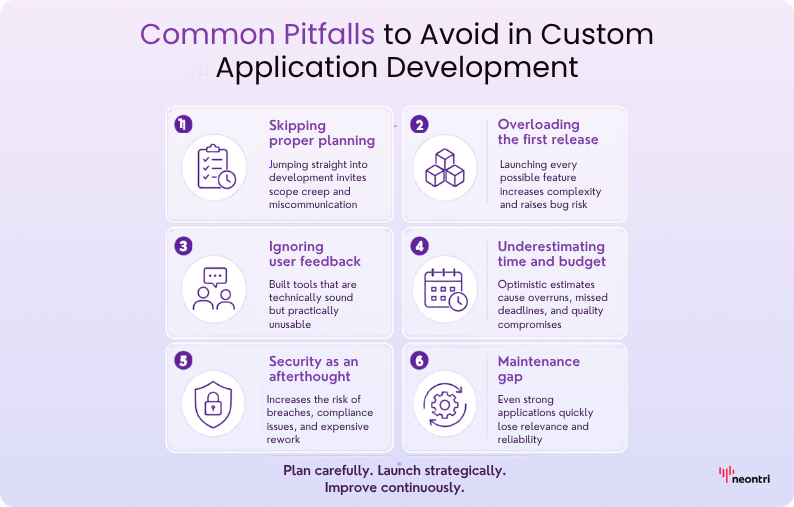
Common pitfalls to avoid in custom application development
Learning from others’ mistakes can save significant time, money, and frustration during your custom development journey. Here are the most common pitfalls that derail projects, along with how to avoid them, based on an extensive analysis of both successful and failed custom application initiatives.
Skipping the planning phase
The rush to start coding often stems from excitement about the solution or pressure to show immediate progress without recognizing the critical importance of proper planning. However, projects that skip planning inevitably experience scope creep, miscommunication between stakeholders, and final products that don’t address the original business problems. Teams end up building technically competent applications that nobody wants to use, wasting substantial resources and damaging confidence in future technology initiatives.
How to avoid: Invest adequate time in thorough requirements gathering and planning. Document expectations, validate assumptions with end users, and ensure all stakeholders agree on the project scope and success criteria before any development begins. Remember that changing requirements during development costs exponentially more than getting them right from the start.
Overloading the first release
This “kitchen sink” approach often results from stakeholders contributing wish lists without prioritization or developers trying to future-proof the application by including functionality that might be needed someday. As a result, attempting to include every conceivable feature in the initial application release often extends development timelines, increases complexity, causes higher bug rates, and delays the realization of benefits. Projects become unwieldy and often never launch because they’re perpetually “almost finished” with just a few more features to complete, creating frustration and budget overruns.
How to avoid: Ruthlessly prioritize features based on business impact and user need. Implement the minimum viable product first, then add features based on actual usage patterns and feedback. Focus initial development on the 20% of features that will deliver 80% of the value.
Ignoring user feedback
Dismissing end-user input or failing to involve them throughout the development process results in applications that are technically sound but practically useless. This often occurs when technical teams become isolated from business users or when developers believe they understand user needs better than users themselves, leading to solutions that miss the mark.
The consequences are poor user adoption, continued reliance on workarounds or old systems, and a failed return on investment despite successful technical implementation. Users may actively resist using the new system, preferring familiar tools even if they’re less efficient.
How to avoid: Integrate user testing and feedback loops throughout every phase of development. Treat users as partners in the development process rather than passive recipients of the final product. Their domain expertise and workflow knowledge are invaluable assets that significantly improve application success and adoption rates.
Underestimating time and budget
The optimism bias affects both internal teams and external developers who want to win projects or please stakeholders with attractive timelines and budgets. It can manifest in overly optimistic estimates or in failing to account for unforeseen complexities, integration challenges, or scope changes, which can wreck the development process. As a result, projects can run out of budget, miss deadlines. This can lead to project cancellation, scope reductions, or quality compromises.
How to avoid: Add a substantial buffer to initial time and budget estimates – typically 25-50% depending on project complexity and organizational experience. Plan for phased delivery that provides value even if later phases are delayed or cancelled. Maintain transparent communication with stakeholders about progress and any necessary adjustments to the timeline or scope.
Security as an afterthought
Focusing exclusively on functionality and user experience while leaving security considerations until late in the development process or ignoring them entirely could lead to data breaches, compliance violations, financial losses, and severe damage to business reputation. Security issues discovered late in development are expensive to fix and may require architectural changes that significantly delay launch.
How to avoid: Incorporate security requirements from the initial planning phase through deployment and ongoing operations. Implement secure coding practices, conduct regular security testing, and consider external security audits for applications handling sensitive information.
Lack of maintenance planning
Too often, teams focus solely on development and launch, neglecting long-term operational requirements. When no plan or budget is allocated for ongoing updates, enhancements, or performance monitoring, the application’s relevance and reliability quickly erode.
Over time, even well-built systems can become outdated or vulnerable. Security threats evolve, technologies shift, and business processes change – yet without consistent attention, these factors go unaddressed. Minor issues or small feature requests accumulate, and what were once quick fixes become major obstacles. As usability declines and new requirements go unmet, user adoption drops, and the system’s strategic value diminishes.
How to avoid: Allocate budget and resources for ongoing maintenance before starting development. Assign clear responsibility for application support and enhancement to specific team members or external partners. Schedule regular reviews to assess application health and plan necessary updates based on changing business requirements.
The future of custom application development
The landscape of custom application development continues evolving rapidly, driven by technological advances and changing business needs. Understanding these trends helps you make strategic decisions about current projects while positioning for future opportunities.
Artificial intelligence integration transforms capabilities
AI integration represents one of the most significant opportunities in custom application development, transforming both what applications can do and how they’re built. Modern applications increasingly incorporate intelligent features like automated data analysis, predictive insights, natural language processing, and adaptive user interfaces that learn from usage patterns.
AI doesn’t just enhance application functionality – it’s also transforming the development process itself. AI-assisted coding tools like GitHub Copilot and GPT-4 help developers write code more efficiently, automated testing identifies issues faster, and intelligent monitoring can predict and prevent problems before they impact users.
Consider how a custom CRM application might evolve with AI integration: instead of simply storing customer information, it could provide automated lead scoring, predict customer churn risk, generate personalized communication recommendations, and optimize sales territory assignments based on historical patterns and market conditions.
Cloud-native architecture enables unprecedented scalability
New custom applications are increasingly built using cloud-native architectures that provide unprecedented scalability, flexibility, and cost-effectiveness. Microservices architectures allow applications to be constructed from modular components that can be updated, scaled, or replaced independently without affecting other system components.
This architectural approach means custom applications can start small and scale gradually as business needs grow, without requiring complete rebuilds or major architectural changes. Serverless computing and containerization technologies further reduce infrastructure complexity while improving reliability and performance characteristics.
Cloud-native development also enables global deployment, automated disaster recovery, and advanced security features that would be prohibitively expensive to implement with traditional on-premises architectures.
User experience expectations continue rising
As consumer software sets increasingly high standards for user experience, business applications face similar expectations from users who interact with elegant consumer apps daily. Users expect custom applications to provide intuitive interfaces, responsive design, and engaging interactions comparable to their favorite mobile apps and web services.
This trend means that custom application development must invest significantly in user experience design and testing. Applications that feel outdated or cumbersome will struggle to gain adoption, regardless of their functional capabilities, making UX design a critical success factor rather than a nice-to-have feature.
Progressive web applications (PWAs) and mobile-first design principles are becoming standard requirements rather than advanced capabilities. Users expect to access business applications seamlessly across devices and operating systems, with consistent experiences that adapt to different screen sizes and input methods.
Continued strategic importance despite SaaS proliferation
Despite the proliferation of SaaS solutions and off-the-shelf software, the need for custom applications continues growing as digital transformation initiatives emphasize technology as a competitive differentiator. Companies that can tailor technology to their specific needs gain significant advantages over competitors using identical generic tools.
The tools and techniques for custom application development will continue evolving, but the fundamental value proposition remains constant: giving your organization exactly what it needs to excel in an increasingly competitive business environment.
Build software that adapts to your business with Neontri
With more than a decade of experience in delivering complex digital solutions, Neontri helps organizations turn software challenges into strategic advantages.
Our team specializes in custom application development, systems integration, and AI-driven digital transformation, combining deep technical expertise with a strong understanding of real-world business needs.
Neontri’s approach goes beyond coding—we act as a strategic technology partner. From defining the right architecture and selecting optimal tools to designing intuitive user experiences and ensuring long-term scalability, every project is built to deliver measurable results.
Having successfully delivered hundreds of custom solutions for global enterprises, banks, fintech innovators, and fast-growing mid-sized companies, our team has built a reputation for reliability, technical excellence, and business impact. Whether the goal is to modernize legacy systems, streamline operations, or create entirely new digital products, Neontri provides the expertise and partnership needed to bring ambitious ideas to life – securely, efficiently, and at scale.
Conclusion
The decision to pursue custom development shouldn’t be taken lightly, but when the signs are clear – multiple workarounds, data silos, growth limitations, or unique competitive requirements – it often delivers transformational value that far exceeds their initial investment. With the rise of low-code platforms and AI-assisted development, custom solutions have become more accessible and cost-effective than ever before.
Ready to explore a custom application for your business? Contact our team for a free consultation to discuss your needs.
FAQ
How long does custom application development typically take?
Simple applications built with low-code platforms can be completed in 4-8 weeks, while moderate custom applications typically take 3-6 months. Complex applications with extensive integrations, advanced features, or large user bases may take 6-18 months. The key is starting with a minimum viable product (MVP) to deliver value quickly, then expanding functionality based on user feedback and evolving requirements.
What’s the typical cost range for custom application development?
Custom application development costs depend on complexity, features, and development approach. Low-code platforms range from $5,000 to $ 50,000, with monthly subscription fees of $50 to $ 500. Outsourced development typically costs $25,000-200,000, while in-house development can range from $50,000-500,000+, depending on team size and timeline. Most businesses achieve ROI within 12-24 months through efficiency gains and cost savings that often exceed the initial investment.
Should small businesses consider custom application development?
Absolutely. Low-code platforms and modern development tools have made custom applications accessible to businesses of all sizes. Small businesses often benefit more from custom solutions because they have fewer legacy systems to integrate and can move more quickly. The key is identifying processes where generic software creates significant inefficiencies or limitations that impact growth potential.
Can custom applications integrate with existing business systems?
Yes, integration capability is one of the primary advantages of custom applications. Custom solutions can be designed from the ground up to integrate seamlessly with your existing CRM, ERP, accounting systems, databases, and other business tools. This integration creates a unified data environment that eliminates silos and provides real-time visibility across your entire operation.
What happens if the developers who built my custom application are no longer available?
This risk can be mitigated through proper documentation, code ownership, and strategic planning. Ensure you own all source code and documentation, maintain comprehensive technical documentation throughout development, and consider using established programming languages and frameworks that other developers can easily understand and maintain. If working with external developers, negotiate knowledge transfer and documentation requirements in your contract.