
With over 7 billion mobile users worldwide, mobile applications now sit at the heart of digital transformation in nearly every industry. Yet, this growth has brought increasing security challenges: 3 in 4 mobile apps still contain at least one vulnerability, and recent breach costs average ~$4.8 million. The threat continues growing—cyberattacks on mobile apps rose sharply in recent years.
So, how can organizations keep up the pace of rapid app development without leaving critical security gaps?
The key is systematic mobile app security testing, a disciplined approach that identifies vulnerabilities before they reach production environments. Companies that adopt robust testing frameworks have seen up to 75% fewer security incidents without sacrificing development speed. Based on Neontri’s proven experience in securing mobile ecosystems for enterprise clients and mobile audit services, this guide offers a practical overview of how to effectively protect your mobile applications in today’s evolving threat landscape.
Key takeaways:
- Implement shift-left security practices to detect vulnerabilities earlier in development cycles, reducing remediation costs significantly.
- Deploy automated testing tools combined with expert manual assessment for comprehensive coverage of the OWASP Top 10 mobile risks.
- Follow OWASP MASVS standards to ensure regulatory compliance and establish industry-recognized security baselines.
- Integrate effective security testing into CI/CD workflows to maintain development velocity while achieving security at scale.
- Focus on critical vulnerability categories that account for the majority of successful mobile application attacks.
Why mobile app security testing has become business-critical
Mobile threats have evolved significantly, from simple device-level risks to complex application-layer attacks that target business logic, data flows, and network communication. Today’s cybercriminals exploit vulnerabilities within application code and architecture, making traditional device security measures no longer sufficient on their own.
Consider the data breach in January 2025 involving location data broker Gravy Analytics, whose Amazon cloud servers were accessed without authorization. This breach exposed vast amounts of user location data collected from popular apps like Candy Crush and Tinder. Among the compromised information were sensitive details linked to government and military sites. This highlights how mobile security failures can lead to serious organizational and reputational consequences.
Current mobile security threat statistics
Security research continues to reveal the scale of mobile application vulnerabilities—issues that represent not just technical gaps, but real business risks demanding immediate action:
![Mobile threat landscape: Key statistics]
75% of mobile apps contain at least one security flaw
83% of organizations suffered a security breach in 2024
54% year-over-year increase in reported data breaches
Significant rise in supply chain attacks targeting mobile frameworks
Extended detection times for mobile app vulnerabilities remain a critical concern](https://neontri.com/wp-content/uploads/2025/08/mobile-security-statistics-1024x641.webp)
Understanding mobile application security fundamentals
Securing a mobile application requires a structured, proactive approach. From data storage to cryptography, every component of an app can introduce risk if not properly secured. A clear understanding of mobile security fundamentals lays the groundwork for building applications that are both resilient and compliant.
The OWASP standard for mobile app security
The OWASP Mobile Application Security Verification Standard (MASVS) provides a practical, testable framework tailored specifically for mobile environments. Unlike generic security guidelines, the standard addresses mobile-specific risks and attack surfaces with clearly defined requirements.
The framework categorizes security requirements across key control areas:
- MASVS-STORAGE: Secure storage of sensitive data on devices (data-at-rest)
- MASVS-CRYPTO: Cryptographic functions to protect sensitive data
- MASVS-AUTH: Authentication and authorization mechanisms used by mobile apps
- MASVS-NETWORK: Protecting data exchanged between mobile applications and remote services
- MASVS-PLATFORM: Secure interaction with mobile platforms and third-party apps
- MASVS-CODE: Security best practices for data processing and keeping apps updated
- MASVS-RESILIENCE: Resilience to reverse engineering and tampering attempts
- MASVS-PRIVACY: Privacy controls to protect user privacy
MAS testing profiles
Starting with MASVS v2.0.0, the framework has evolved from traditional verification levels to comprehensive testing profiles:
| MAS testing profiles | Details |
|---|---|
| Basic | – Fundamental security controls for general commercial applications – Addresses common vulnerability patterns and implementation errors – Suitable for applications handling standard business data without regulatory constraints |
| Defense-in-depth | – Advanced security controls for applications processing sensitive information – Incorporates comprehensive threat modeling and security architecture requirements – Mandatory for financial services, healthcare, and enterprise applications |
| Resilience | – Anti-tampering and reverse engineering protections – Safeguards intellectual property and prevents runtime manipulation – Critical for applications containing proprietary algorithms or sensitive business logic |
Essential regulatory compliance frameworks
Today’s mobile apps have to meet a growing list of regulatory requirements. Falling short can lead to serious consequences, including fines that take a big cut of your global revenue. That’s why strong and regular security testing isn’t just good practice, it’s a smart business move.
Some of the key regulations that impact mobile applications include:
- GDPR: European Union rules for user data privacy and consent
- PCI DSS: Security standards for handling payment card transactions
- CCPA: California law governing the collection and use of consumer data
- HIPAA: U.S. healthcare regulations with average security breach costs of $10.1 million
- SOX: Sarbanes-Oxley financial reporting controls for publicly traded companies
Each of these mandates comes with specific technical requirements, and those controls must be verified through robust security testing before any app goes live.
High-risk mobile app vulnerabilities
With mobile app security standards in place, the next step is understanding the most critical vulnerabilities. Based on the latest OWASP Mobile Top 10 (2024) and real-world assessments, these are the high-risk issues mobile development teams need to address:
| Vulnerability | Risk level | Business impact | Details |
|---|---|---|---|
| #1: Improper credential usage | Critical (OWASP M1) | Unauthorized access through hardcoded credentials or insecure storage | Truffle Security found over 10,000 insecure GitHub SSH keys out of 57 million |
| #2: Inadequate supply chain security | Critical (OWASP M2) | Malicious code injection via compromised third-party components | Vulnerabilities in third-party libraries, SDKs, and frameworks during development |
| #3: Insecure authentication mechanisms | High | Account takeover and privilege escalation attacks | Weak passwords, poor session management, lack of MFA |
| #4: Insecure data storage implementation | High | Data exposure from device compromise or app exploitation | Unencrypted databases, plaintext API keys, sensitive logs |
| #5: Insufficient transport layer protection | High | Man-in-the-middle attacks, data interception | Only 64% of apps implement TLS/SSL correctly; 73% of vulnerabilities are API-related |
| #6: Improper platform usage | High-medium | Exploitation of platform-specific features and APIs | Incorrect keychain use, Android Intent flaws, insecure inter-process communication |
| #7: Code quality and input validation issues | High | Memory corruption, injection attacks, logic bypass | 87% of tested apps had API discovery issues, 68% exposed hardcoded URLs |
| #8: Code tampering vulnerabilities | Medium | IP theft, bypassing security controls | Nearly 75% of apps left debug symbols in code |


Secure your mobile apps today
Get expert vulnerability assessment and penetration testing to identify and fix critical security flaws before they impact your business.
How to approach mobile security testing
No single method can catch every vulnerability. The most effective security strategies combine multiple testing approaches and apply them at every stage of mobile app development. When these methods work together, teams get broader coverage, fewer blind spots, and stronger overall protection.
Static Application Security Testing (SAST)
SAST analyzes application source code without execution, identifying vulnerabilities during development phases. 83% of applications exhibit at least one security issue during initial vulnerability assessment, making early detection critical.
Core SAST advantages:
- Finds vulnerabilities early, during active development
- Pinpoints exact code locations for faster fixes
- Fits easily into CI/CD pipelines
- Scales well across large application portfolios
Key SAST limitations:
- Misses issues that only appear during runtime
- Can generate false positives that need expert review
- Doesn’t fully cover risks in third-party libraries or frameworks
- Struggles to detect complex business logic flaws without manual analysis
Neontri’s recommendation: While it’s effective for catching code-level issues early, it should be combined with other testing methods and expert review to ensure full coverage, especially for runtime behavior, third-party components, and complex business logic.
Dynamic Application Security Testing (DAST)
DAST analyzes running applications by simulating real-world attacks. As a black-box method, it focuses on vulnerabilities that only appear during execution—insights that static analysis can’t provide.
Essential DAST capabilities:
- Identifying runtime vulnerabilities in real time
- Testing the security of network communications and protocols
- Evaluating authentication and session management controls
- Checking input validation across all user interaction points
Best practices for mobile DAST:
- Test across multiple devices, OS versions, and hardware types
- Simulate different network conditions: Wi-Fi, cellular, and offline
- Evaluate permissions and access levels under varied user scenarios
- Validate data sync security in offline-capable apps
Interactive Application Security Testing (IAST)
IAST blends the strengths of SAST and DAST. It works by monitoring the app in real time while tests are running, offering both code-level precision and runtime visibility. The fact that 32% of security decision-makers have adopted IAST in their development environments reflects growing recognition of its effectiveness.
IAST operational advantages:
- Detects vulnerabilities during execution and pinpoints exact code locations
- Automatically verifies issues, reducing manual effort
- Integrates easily with existing CI/CD pipelines and testing tools
- Analyzes security risks in the context of both code and behavior
Expert manual penetration testing
Despite advances in automation, manual penetration testing remains indispensable. Skilled security professionals uncover advanced threats and business logic flaws that tools often miss, particularly in custom apps or complex workflows.
Key areas manual testing focuses on:
- Validating business logic and non-standard workflows
- Testing advanced authentication bypass and session hijacking
- Exploring user interaction risks, including social engineering
- Auditing custom cryptographic implementations and key handling
- Assessing third-party APIs and integration points for abuse risks
Neontri’s recommendation: Schedule manual testing processes at key development milestones. Aligning it with major releases or feature rollouts increases the chances of catching critical security flaws before they go live.
For applications handling sensitive financial data, a truly secure environment requires more than isolated tests, demanding a thorough understanding of fintech application security strategies.
Integrating security throughout mobile development lifecycles
Security works best when it’s built in from the start, woven into planning, development, testing, and deployment. A consistent, stage-by-stage approach reduces risk, lowers costs, and supports faster, safer releases.
The shift-left security revolution
Pushing security to the end of the development cycle leads to delays and higher remediation costs. Shift-left brings testing into earlier stages, making it easier to catch and fix issues before they become expensive problems. For new mobile applications, starting with a security-focused MVP approach ensures security is built into the foundation rather than added later.
Comprehensive shift-left implementation strategy:
| Phase | Key security activities |
|---|---|
| Planning and architecture | – Perform threat modeling based on app functionality and data flow- Define security requirements using standards like OWASP MASVS- Map risks and regulatory needs |
| Active development | – Use IDE security plugins for real-time feedback- Enforce secure coding guidelines and developer training- Run pre-commit scans through version control hooks |
| Quality assurance | – Embed automated security tests into CI/CD pipelines- Schedule regular pen tests for high-impact apps- Track vulnerabilities with SLAs for resolution |
| Pre-production and deployment | – Conduct final security checks before production release approval- Implement runtime protection and active threat monitoring- Set up incident response workflows for continuous monitoring |
Securing the CI/CD pipeline
Mobile development cycles move quickly. To keep up, security testing must match that speed, without slowing down releases. Well-designed CI/CD security gates allow teams to detect issues early while maintaining delivery speed and reliability.
Key security checks to build into your pipeline:
#1: Source code commit validation gateway
- Run SAST scans on new code, with severity-based blocking for critical issues
- Perform software composition analysis to catch vulnerable dependencies and license risks
- Automatically detect hardcoded credentials and secrets, with real-time developer alerts
#2: Build process security validation layer
- Scan container images for known vulnerabilities, including base layers
- Validate configurations against internal security baselines and industry best practices
- Check all third-party components for license compliance before packaging
#3: Pre-production testing execution framework
- Execute DAST against staging environments that reflect production conditions
- Validate compliance with relevant regulatory frameworks (e.g., GDPR, HIPAA, PCI DSS)
- Assess the performance impact of security controls to avoid degrading user experience
#4: Production deployment approval process
- Review unresolved critical or high-risk findings with the security team
- Document any accepted risks, with clear business justification
- Verify that monitoring, alerting, and incident response systems are correctly configured and active
Neontri’s tip: Don’t treat security as a final checkbox. Teams that automate and embed security early in their pipelines see fewer production issues, faster release cycles, and stronger compliance posture.
To streamline this process in highly regulated sectors, leveraging specialized expertise in e.g. banking, fintech or insurance mobile application development helps teams select the right tools for harmonizing security with specific environment requirements
Best practices and essential security testing tools
As every mobile app environment is different, the most reliable results come from combining proven testing practices with tools that fit your setup.
Leading mobile security testing platform ecosystem
The mobile security testing landscape encompasses both commercial enterprise platforms and robust open-source alternatives. Rather than single-solution dependencies, organizations can achieve optimal security outcomes through strategic tool combinations.
| Testing methodology | Commercial leaders | Open source options | Optimal application scenarios |
|---|---|---|---|
| Static code analysis | Veracode, Checkmarx, Fortify | SonarQube, Semgrep, CodeQL | Source code vulnerability detection and remediation |
| Dynamic runtime testing | NowSecure, Rapid7 AppSpider | OWASP ZAP, Nuclei | Runtime vulnerability assessment and exploitation validation |
| Interactive hybrid analysis | Contrast Security, Synopsys | Limited enterprise-grade options | Combined static and dynamic testing approaches |
| Expert manual assessment | Specialized security consultancies | OWASP Mobile Testing Guide | Business logic validation and advanced threat modeling |
For organizations looking to accelerate secure mobile development from the ground up, Neontri’s Enterprise Application Framework provides a pre-built foundation with integrated security controls and testing capabilities.
Strategic tool selection and evaluation methodology
Selecting the right security testing tools requires systematic evaluation of organizational requirements, technical constraints, and business objectives:
Technical evaluation criteria:
- Comprehensive platform compatibility across iOS, Android, and cross-platform development frameworks
- Native integration capabilities with existing development tools, IDEs, and deployment pipelines
- Testing accuracy metrics, vulnerability coverage rates, and false positive management
- Customization flexibility and security policy configuration options for organizational requirements
Business decision factors:
- Total cost of ownership, including licenses, training, and support
- Quality of vendor support and escalation paths
- Built-in compliance reporting and audit trail features
- Scalability across growing app portfolios and mobile developers
Managing false positives without losing coverage
Automated security testing often generates false positive alerts that drain developer time and weaken trust in security tools. With proven strategies, teams can reduce noise, maintain visibility, and focus on what truly matters.
Here are a few that work:
- Baseline tuning: Adjust scans based on your app’s logic and architecture
- Context-aware analysis: Evaluate findings in the full business and technical context
- Ongoing calibration: Regularly refine tool settings based on real results and team feedback
- Expert review loops: Let experienced analysts validate complex or uncertain issues
- Risk-based prioritization: Triage based on real-world impact and likelihood of exploitation


Expert security implementation
Let our mobile security specialists help you select, configure, and optimize the right testing tools for your development pipeline.

Building enterprise-grade mobile security programs
Security at scale depends on how teams work together. Clear roles, shared accountability, and consistent collaboration are what turn good security practices into a sustainable program.
Organizational structure and accountability framework
Successful mobile security programs require clear accountability and seamless collaboration across development, security, and operations functions. Organizations with dedicated DevSecOps capabilities report improved security outcomes with faster incident response times.
Key roles and responsibilities:
- Security champions network:
- Developers trained to spot and address security issues early
- First point of contact for secure coding practices and tooling questions
- Helps translate security goals into development processes
- DevSecOps engineering team:
- Owns tool implementation, config management, and automation
- Integrates security checks directly into development pipelines
- Tracks key metrics and reports outcomes to leadership
- Security architecture leadership:
- Oversees secure design and threat modeling at the architecture level
- Defines standards, writes policy, and guides governance practices
- Aligns program strategy with regulatory and industry frameworks
Continuous improvement and threat monitoring
Mobile security represents an ongoing operational process requiring constant attention and adaptive responses.
Core practices:
- Threat intelligence integration: Stay ahead of new attack techniques and potential vulnerabilities
- Tool performance reviews: Track accuracy, false positive rates, and detection gaps
- Team capability assessments: Monitor response times and invest in skill development
- Compliance tracking: Align with changing regulations and validate regularly
Success measurement and executive reporting
To get support and sustain investment, security leaders need metrics addressing both technical performance and business impact outcomes:
| Category | Key metrics |
|---|---|
| Technical performance indicators | – Mean time to vulnerability detection across all testing methods and components – Mean time to remediation with severity-based SLA tracking – Testing coverage across features, code bases, and environments – False positive rate trends and accuracy improvements |
| Business impact measurements | – Cost avoidance from early detection and remediation – Regulatory audit pass rates and compliance effectiveness – User trust, retention, and brand reputation metrics – Development speed maintained during security integration |
Your mobile app security implementation roadmap
It’s easier to reach your security goals when you know the path. This roadmap shows the key phases that take you from a solid starting point to a program that can scale.
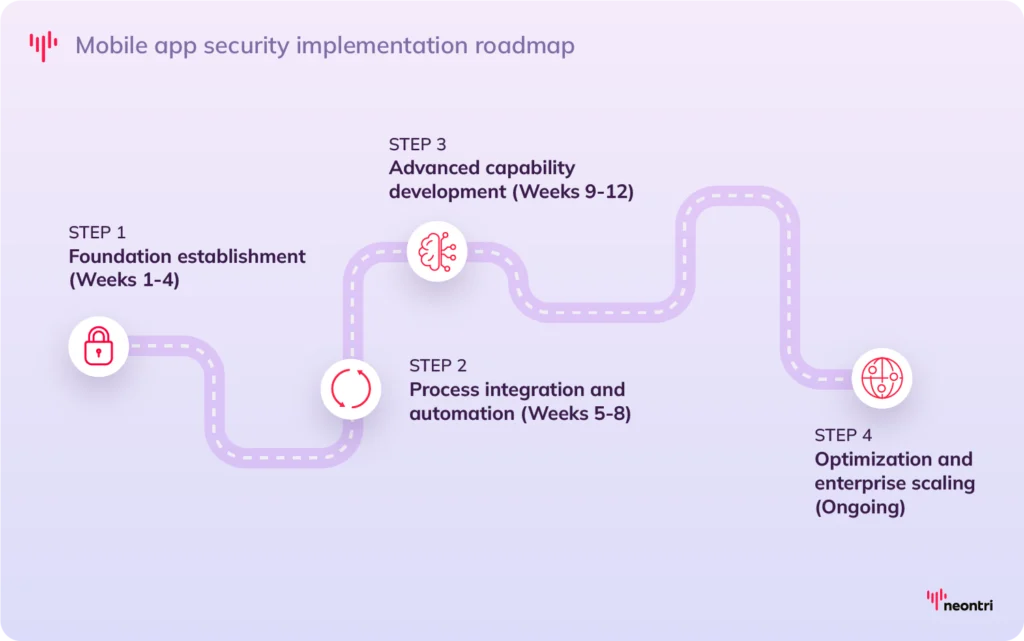
Phase 1: Foundation establishment (Weeks 1-4)
The first step is to set a strong base by assessing current security posture, defining standards, and equipping teams with the right tools and skills. So, organizations should:
- Conduct a baseline security assessment of existing applications using the OWASP MASVS framework and relevant industry benchmarks
- Define organizational security policies, including secure coding guidelines, testing requirements, and compliance standards
- Select and procure security testing tools through structured vendor evaluation and proof-of-concept testing
- Launch developer training programs on secure coding, threat awareness, and effective tool usage
Phase 2: Process integration and automation (Weeks 5-8)
Once the foundation is in place, security needs to become part of everyday workflows through automation and clear processes:
- Integrate automated security checks into CI/CD pipelines, with testing gates, validation points, and remediation workflows
- Deploy SAST and DAST tools in development and testing environments, configured with tailored rule sets
- Establish vulnerability management workflows with defined responsibilities, escalation paths, and SLA tracking
- Create security review processes for major releases, architectural changes, and third-party integrations
Phase 3: Advanced capability development (Weeks 9-12)
With core processes running smoothly, focus shifts to advanced capabilities that strengthen detection, response, and resilience:
- Integrate expert manual penetration testing for business-critical applications and high-risk system components
- Deploy runtime protection mechanisms for production application monitoring with active threat detection
- Establish continuous monitoring systems with threat intelligence integration and automated incident response
- Develop comprehensive incident response procedures for security event handling, containment, and recovery
Phase 4: Optimization and enterprise scaling (Ongoing)
Mature programs don’t just maintain; they adapt and improve to meet evolving threats and business needs:
- Measure and optimize testing effectiveness, efficiency metrics, and accuracy improvements across all methodologies
- Expand security testing coverage across entire application development portfolio with risk-based prioritization
- Implement advanced threat modeling and security architecture review processes for new applications
- Maintain regular training programs and security awareness initiatives with evolving threat landscape education
Final thoughts
Mobile application security testing is no longer optional. It’s a core requirement that shapes customer trust, regulatory compliance, and market competitiveness. Organizations that adopt comprehensive testing programs see measurable reductions in risk while maintaining development speed and adaptability.
The mobile threat landscape will keep evolving, with AI and machine learning introducing both new attack methods and more advanced defenses. By establishing strong security foundations today, organizations position themselves to meet future challenges while protecting critical digital assets and customer relationships.
Industry data shows the business value is clear: investments in mobile application security deliver a 183% return over three years, reducing exposure and improving detection capabilities