AI applications are changing how businesses operate, from automating tasks and boosting decision-making to personalizing user experiences at scale.
Artificial intelligence helps companies work smarter, move faster, and unlock new areas for growth. But building a successful app takes more than plugging in a model. It requires the right strategy, tools, and execution.
In the article, you’ll find the key steps on how to create an AI app, with recommended tools, frameworks, and deployment platforms. It also covers tips on choosing an AI development partner and common challenges with ways to overcome them, drawn from Neontri experience.
Key takeaways:
- Successful AI app development starts with a clear business goal and a well-defined problem to solve.
- While challenges like high costs, limited talent or model bias exist, they can be managed through smart planning, proper tools, and experienced development support.
- Choosing the right tech stack and vendor is just as important as the strategy itself. A capable partner with relevant experience can reduce risk, speed up delivery, and ensure long-term success.
What are the key steps in AI app development?
When building an AI app, focus on these key steps to ensure it performs well and meets goals:
| Steps | Details | Neontri’s recommendations |
|---|---|---|
| Step #1: Define goals and validate the solution | Begin with AI strategy planning to define the business problem, assess potential value, and establish whether an AI application is the right investment. In some cases, simpler technologies might be more effective. Once you’ve validated the approach, define the success metrics such cost savings, faster processes or higher user engagement. Also, outline the scope, timeline, and budget. Estimated time: 1-4 weeks; for enterprise projects, it might take 6 weeks or more due to stakeholders reviews. | Use the MVP (Minimum Viable Product) approach. Begin with core functionality and then expand features based on user feedback and performance data. |
| Step #2: Outline the app’s features and capabilities | Map out the AI app’s specific features. Some of the core functionalities might include predictive analytics for business insights, chatbots for support or image recognition for automated tasks. Next, consider how the app will connect with other systems. Most AI applications need to work with tools like payment platforms, customer databases or third-party APIs. Make sure these integrations are planned early so everything works smoothly with your AI models and the overall user experience stays seamless. Estimated time: 1-2 weeks; 2-4 weeks for enterprise and larger projects | Include fallback options in case the AI can’t handle something correctly. At the same time, design interfaces that make it easy for users to understand and use the app’s features. |
| Step #3: Design user experience and interface | Create a user interface that clearly communicates what the AI can do. Users should feel comfortable using AI features and know how to get help. Plan for edge cases and include ways to show artificial intelligence results, accept corrections, and collect feedback. Estimated time: 1-3 weeks; 3-6 weeks for enterprise and larger projects | Test interface ideas early with real users. AI interactions should feel natural and trustworthy, not confusing or intimidating. |
| Step #4: Gather and prepare data | As AI thrives on data, collect relevant and high-quality datasets. For example, when building a recommendation engine, gather as much user behavior insights as possible to train the model on and to use. For image recognition, compile diverse visual examples across different contexts. Then, clean the data, fix missing values, and remove duplicates. Estimated time: 2-4 weeks; 4-8 weeks for enterprise projects. This step often takes more time than expected, so plan accordingly. | A smaller, well-prepared dataset often outperforms a large, messy one. Prioritize data quality over quantity and plan for regular updates. |
| Step #5: Build data privacy and security guardrails | Set clear data protection standards from the start. Add multi-factor authentication, strict access controls and audit trails. Make sure the app’s system meets regulations like GDPR, CCPA or HIPAA, depending on your market. Limit data collection to what is truly needed. Estimated time: 1-2 weeks; 3-8 weeks for larger initiatives | Train your team on ethics, privacy, and bias. Regular audits should be part of the ongoing process, not a one-time activity. |
| Step #6: Choose the right AI model and framework | Select an AI model that fits your use case. NLP models are a good choice for chatbots and sentiment analysis, whereas vision models work well with images. If using a large language model (LLM), prompt engineering becomes just as important as model choice. Well-crafted prompts improve output quality, while poor ones can lead to irrelevant or biased results, even with a strong model. Decide between using pre-built AI services from providers like OpenAI, Google, and AWS, or building something custom using open-source models like Llama, DeepSeek, Qwen, etc.. The first option is easier to implement and is more reliable. Custom models offer more control and potentially better performance for certain contexts. Estimated time: 1 week; 2-4 weeks for enterprises | Use proven models and frameworks first. Build custom solutions only when off-the-shelf tools can’t deliver. |
| Step #7: Decide on model training strategy | Even though training models from scratch is possible, it’s often unrealistic given the time, data, and expertise required. For LLM applications, choosing between RAG and fine-tuning depends on whether the priority is access to changing business information, more consistent model behavior, or both. It’s often faster and more practical. Many successful AI apps combine multiple pre-trained models rather than building everything from the ground up. Estimated time: 1-2 weeks with pre-trained models; 2-8 weeks or more for custom training | Unless it’s a use case that requires a unique solution, start with pre-trained models. It’s always possible to switch later. |
| Step #8: Select development tools and platforms | Choose development tools and platforms that match the project’s technical needs and your team’s capabilities. For AI-driven applications, this often means selecting: – Development frameworks like Python, FastAPI, or Node.js for backend logic. – AI/ML libraries such as Hugging Face, LangChain, scikit-learn, or TensorFlow, depending on your use case. – Cloud platforms like GCP Vertex AI, AWS Bedrock, or Azure AI for model hosting, orchestration, and scalability. Estimated time: 1-2 weeks | Use tools the team knows well and can manage in the long run. Even if starting small, plan for growth from the very beginning. |
| Step #9: Integrate AI into the app | Connect your AI models to both the frontend and backend of the app using well-structured APIs. These connections should handle real-time requests smoothly and keep the system stable. Add error handling, limits on requests, and backup plans in case the AI goes down. Since AI features can use considerable computing power, design the system to manage different traffic levels and response times. Use caching, load balancing, and efficient data flow to keep performance steady. Estimated time: 2-4 weeks, for more complex projects, it’s 4 weeks or more | Stick to proven API practices and clearly document how everything connects. This makes it easier to maintain and improve the app later. |
| Step #10: Test the app and refine | Run a full range of tests, from unit tests to user acceptance testing. Focus on AI-specific checks like fairness, edge cases, and resilience to unexpected inputs. Test how the model performs across different groups and scenarios. When LLMs are involved standard testing isn’t enough. Focus on: – AI-specific checks: fairness, edge cases, consistency, explainability, and resilience to unexpected or adversarial inputs. – LLM evaluations: use structured evals (e.g., prompt-based metrics, accuracy, factuality, coherence) to assess model quality across different scenarios and user groups. – Guardrails: implement safeguards to filter harmful, biased, or irrelevant outputs, and ensure responsible behavior in production. Testing should reflect both technical robustness and real-world user impact—especially when AI drives core decisions or content. Estimated time: 1-2 weeks or 3-8 for larger projects | Use automated tests for speed. Manual testing should focus on user experience and edge cases that automated tests might miss. For LLMs use evals and guardrails. |
| Step #11: Deploy and monitor | Roll out your app with monitoring in place. Track performance metrics like speed and error rates, along with business goals such as user activity. To improve the model over time, use real-time alerts and schedule regular updates. Estimated time: 1-2 weeks+ ongoing | Start with a small group of users and scale up gradually. Watch closely for model drift and make updates as needed. |


Get your AI app development roadmap
Receive a custom AI development plan with platform recommendations and cost projections to accelerate your launch and maximize ROI.
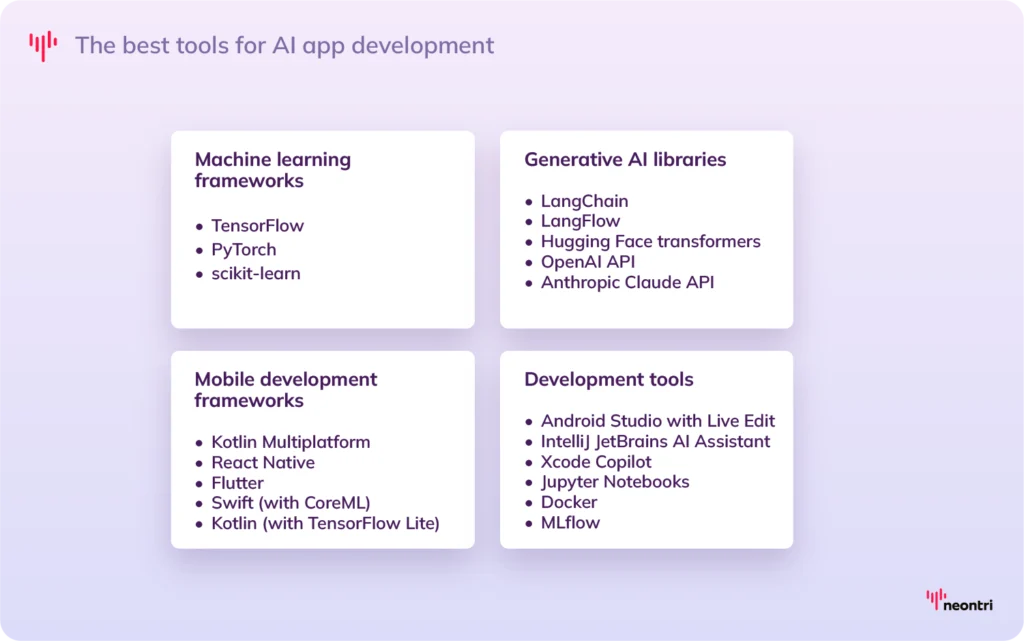
What tools and frameworks are best for AI app development?
To build a successful AI app, companies need to invest in a strong technical foundation that supports core AI functionalities, user experience, and scalability needs. Let’s take a look at the proven options that help teams move strategically and create reliable AI products.
Machine learning frameworks
Start with machine learning frameworks. These form the foundation for most AI capabilities, from predictive analytics to deep learning:
- TensorFlow is a powerful, widely used framework ideal for building and training deep learning models.
- PyTorch is a flexible, developer-friendly framework favored for its dynamic computation graph and strong support for research and rapid prototyping.
- scikit-learn is best for classic machine learning tasks like classification or regression and is often used in early-stage projects.
Generative AI libraries
For generative AI use cases, such as building apps with large language models or content generation features, consider these libraries:
- LangChain simplifies building apps powered by language models, including chatbots and AI agents.
- LangFlow provides a visual interface for designing and testing LangChain workflows, making it easier to prototype and refine AI applications without heavy coding.
- Hugging Face transformers offer a library of pre-trained models for natural language processing and related tasks.
- OpenAI API and Anthropic Claude API give direct access to advanced models like GPT and Claude for everything from content generation to summarization.
Mobile development frameworks
Next, look at mobile development options. These tools help integrate AI into mobile apps quickly and efficiently:
- Kotlin Multiplatform lets you share code across iOS and Android while still building native features, making it easier to integrate AI components without duplicating effort.
- React Native and Flutter are cross-platform frameworks that support AI integration through libraries and plugins.
- Native development options like Swift (with CoreML) and Kotlin (with TensorFlow Lite) give more control when building AI-powered apps for iOS or Android.
Development tools
Finally, use development and infrastructure tools to support the AI lifecycle:
- Android Studio with Live Edit speeds up iteration for Android projects.
- IntelliJ JetBrains AI Assistant adds AI-powered coding to JetBrains IDEs.
- Xcode Copilot offers AI-assisted coding for Apple’s native IDE (currently limited).
- Jupyter Notebooks offer an interactive environment for model development, testing, and collaboration.
- Docker ensures consistent deployment across environments. It’s useful when teams work with multiple models or tools.
- MLflow helps manage the machine learning lifecycle, from tracking experiments to deploying models at scale.
Neontri’s recommendation:
For medium-sized AI apps, use tools that balance speed and flexibility. Pre-trained models (OpenAI, Hugging Face or Google AutoML) and lightweight frameworks like LangChaint. For mobile, Flutter or React Native help reduce costs and speed up delivery. Start with an MVP, then refine based on real feedback.
When building enterprise-level AI apps, on the other hand, focus on scalability, security, and integration. Use robust frameworks like TensorFlow or PyTorch and manage workflows with MLflow or Kubeflow. In regulated sectors, choose platforms like Azure AI or IBM Watson that support privacy by design. In the case of mobile, go with native tools (Swift/Core ML, Kotlin/TensorFlow Lite) to ensure performance and compliance.
Read AI Revolution Across Industries to see how domain‑specific AI strategies drive results in finance, retail, healthcare, and logistics.
What are the challenges in AI app development?
AI applications offer strong business potential, but development might come with technical and operational hurdles. By understanding these challenges early and planning the right ways to overcome them, companies can stay on track and build scalable, effective solutions.
| Challenge | Description | How to overcome |
|---|---|---|
| Collecting and managing data effectively | AI models depend on data to work well. Yet, according to Gartner, only 3% of business data meets basic quality standards. Poor data costs companies around $15 million per year and leads to biased and unreliable outputs. | – Define clear quality standards for your app’s data, making sure it’s accurate, complete, and consistent – Use validation rules to catch errors early and remove duplicate or inconsistent entries before training begins – Invest in tools that automate data cleaning – Standardize how data is collected across the systems so everything stays aligned as the app scales |
| High costs and resource consumption | Developing and running AI models requires large amounts of computing power and specialized infrastructure, which drives up costs. | – Start with cloud-based services like AWS, Azure or Google Cloud, which allows companies to scale resources as needed and avoid heavy upfront costs – Use pre-trained models where possible; they’re often faster and more affordable to adapt than building your own – Track expenses closely, set spending limits, and plan the budget with room for testing and changes |
| Complexity of AI models | AI models might be difficult to build, tune, and maintain. The more complex they are, the more time and expertise they require, which slows development down and increases the chance of failure. | – Choose well-known models that are easy to understand and improve gradually – Use established frameworks like TensorFlow or PyTorch to speed up development and avoid reinventing the wheel – Train the team and keep clear, updated technical documentation |
| Ethical and bias concerns | AI models carry the same bias as the data they’re trained on. This is especially risky in regulated sectors where legal and reputational damage can be serious. | – Opt for diverse and balanced datasets that reflect your user base – Test for bias regularly, especially across different demographics, and set up systems to catch issues early – Create internal review processes with diverse input and follow legal standards like GDPR or CCPA – Be clear with users about how decisions are made |
| Lack of skilled talent | There’s a growing shortage of qualified AI experts, with over 4 million roles expected to go unfilled by 2026. This talent gap can cost companies an average of $2.8 million per year due to delayed AI projects. | – Train existing team members who already understand internal processes and can learn AI skills faster than external hires who lack domain knowledge – Work with experienced AI partners who can support the development process – Consider automated tools and low-code platforms that reduce the need for specialized AI knowledge – Explore remote talent to expand the hiring pool beyond local markets For more insights, check out Application Development Outsourcing: Tapping into Cost-Effective Specialized Expertise |
| Integration and compatibility issues | AI systems often need to connect with older databases or software that weren’t built for this type of technology. This can cause delays, maintenance issues, and demand more processing power than older systems can handle. Intensive AI workloads may also increase energy use, raising costs and sustainability concerns. | – Go for standardized APIs and common data formats that make integration more straightforward – Design modular architectures that separate AI components from other systems, making it easier to update or replace components without affecting the entire application – Test integration early using real-world scenarios- Where possible, optimize models and infrastructure to reduce energy demands and work efficiently within available hardware limits |
Neontri’s recommendation: Start with realistic goals and build gradually. Data quality, team development, and a clear architecture matter just as much as the AI itself. Use partnerships and proven tools to speed up progress while keeping standards high. And above all, treat AI development as a strategic, long-term process, not a one-off project.


How to create an AI app with that respects user rights and privacy
Building ethical AI applications requires careful planning and a clear focus on user rights. As artificial intelligence becomes more embedded in various products and services, businesses need to design systems that treat users fairly, protect their data, and remain transparent at every step.
Follow these tips to build an AI app that respects privacy, avoids bias, and earns user trust:
- Create a clear AI policy: Outline how AI will be used responsibly in the product. Define the approach to fairness, transparency, and data protection, and make sure all teams and stakeholders understand it.
- Understand and follow regulations: Identify which privacy and data laws apply based on the users and industry (e.g. GDPR, CCPA or HIPAA). Design the app to meet those standards from the start.
- Test for bias regularly: Set up technical testing and diverse human review teams to spot bias in model predictions. Check how your AI behaves across different user groups and situations.
- Be transparent with users: Let users know when they’re interacting with AI and what data is being used. Offer simple explanations for how important decisions are made.
- Make feedback easy: Give users clear ways to report issues or concerns. Respond quickly and openly about how problems are being addressed.
What are the best platforms for deploying AI-powered apps?
Choosing the right deployment platform is a key decision that affects app performance, scalability, security, and overall cost. The best option depends on technical needs, team expertise, and how the app will be used. Here are some of the top platforms for AI deployment worth considering.
Cloud-based AI platforms are the go-to option for most AI applications, offering scalability, managed services, and global reach:
- Amazon Web Services (AWS) provides one of the most mature AI ecosystems. Services like SageMaker (model training), Rekognition (image analysis), and Textract (document processing) support a wide range of use cases and variable user loads.
- Google Cloud Platform (GCP) works well with tools like TensorFlow and other machine learning tools. Vertex AI simplifies end-to-end model development, while AutoML helps non-experts build models quickly. GCP is particularly useful for projects focused on data analytics or natural language processing.
- Microsoft Azure AI delivers enterprise-grade tools and easy integration with Microsoft’s ecosystem. It supports both pre-built services and custom model development, which makes it often the right choice for companies already using Microsoft 365 or Dynamics.
- IBM Watson is designed for business AI, particularly in regulated industries like healthcare or finance. It’s known for transparency and compliance support, and is ideal for organizations with strict data or audit requirements.
Explore Cloud App Development: Benefits, Challenges, and Best Practices to learn how to build scalable, secure applications in the cloud.
Another option is simplified deployment platforms, which are a good fit for teams that need quick setup and minimal maintenance, especially in the early stages of development:
- Heroku works well for launching MVPs or early-stage projects. It’s not built specifically for AI, but it supports major frameworks and allows fast deployment, so teams can concentrate on development without dealing with complex infrastructure.
- Hugging Face Spaces allows teams to deploy AI models quickly and create interactive demos using tools like Gradio and Streamlit.
Edge AI platforms offer another deployment path for apps that need fast, on-device processing or must meet strict privacy requirements.
- AWS IoT Greengrass lets developers extend AWS services to local devices. It enables real-time processing and secure data handling on IoT systems.
- NVIDIA Jetson is designed for high-performance edge computing. It supports AI in devices like smart cameras, industrial machines, and robots.
Neontri’s recommendation: The deployment strategy should match your app’s size, goals, and available expertise. Oftentimes projects benefit from a hybrid setup—using cloud development services and edge platforms for real-time performance and stronger data privacy.
Examples of successful AI apps
Beyond giants like OpenAI or Google driving the market, there’s a growing wave of AI apps delivering real value to everyday users:
Perplexity
It’s an AI-powered search and answer engine that combines conversational responses with cited sources. By offering accurate, well-referenced answers in natural language, Perplexity makes research faster, easier, and more reliable. As of early 2026, Perplexity processes about 780 million search queries per month, with strong ongoing growth, reflecting its widespread adoption and user trust.
ElevenLabs
ElevenLabs is a leading AI voice platform capable of producing highly realistic speech in multiple languages and styles. Its voice synthesis technology is so advanced that it delivers ultra-realistic voices in over 70 languages, nearly indistinguishable from human speech.
The company has been valued at $3.3 billion after raising $180 million in recent funding and users have created over 100 years’ worth of audio content on its platform. Businesses like Callin.io that integrate ElevenLabs’ voices have reported up to a 35% increase in customer engagement and satisfaction.
Jasper
It’s an AI content generation platform designed to help marketing teams produce high-quality, on-brand copy for ads, blogs, emails, and more. It improves content workflows by accelerating production while ensuring consistency in tone and messaging across channels.
It’s an AI content generation platform designed to help marketing teams produce high-quality, on-brand copy for ads, blogs, emails, and more. Jasper accelerates content workflows with consistent tone and messaging. It supports more than 50,000 active business customers worldwide and helps them create content that converts while reducing production time by up to 30% compared to traditional methods.
Choosing the right AI app development partner
The right partner can significantly impact the success, scalability, and security of an AI project. Beyond technical expertise, what matters is how well the vendor understands the business environment, handles delivery, and supports long-term collaboration. Here are key aspects companies should pay attention to when selecting a partner:
- Solid technical expertise: A strong team should have hands-on experience with AI technologies and a portfolio to prove it. So, look for a vendor that can build scalable apps and work confidently with cloud platforms and mobile technologies, both native and cross-platform.
- Industry knowledge: Avoid generic solutions. A good partner understands the challenges and regulations specific to your industry, whether that’s data privacy or financial controls. They should be able to integrate AI into real business workflows and systems, understanding that artificial intelligence rarely works in isolation.
- Development approach: The way a partner manages delivery reveals a lot about how reliable they’ll be long term. Thus, companies should collaborate with teams that follow Agile workflows and apply DevOps practices to ensure flexibility and faster iteration. A solid vendor will also prioritize continuous testing to maintain stability as the app evolves, along with bias checks and strong documentation.
- Ethical and privacy standards: Trust is non-negotiable when building AI. A serious partner will embed fairness, transparency, and privacy into every stage of development. They should also guide every client through compliance requirements and help explain how the AI works in a way users can understand.
- Reliable collaboration: Choose a team that communicates clearly, shares progress regularly, and offers long-term support. Aligned working styles, transparent pricing, and steady delivery are key to building trust and staying on track—through launch and beyond.
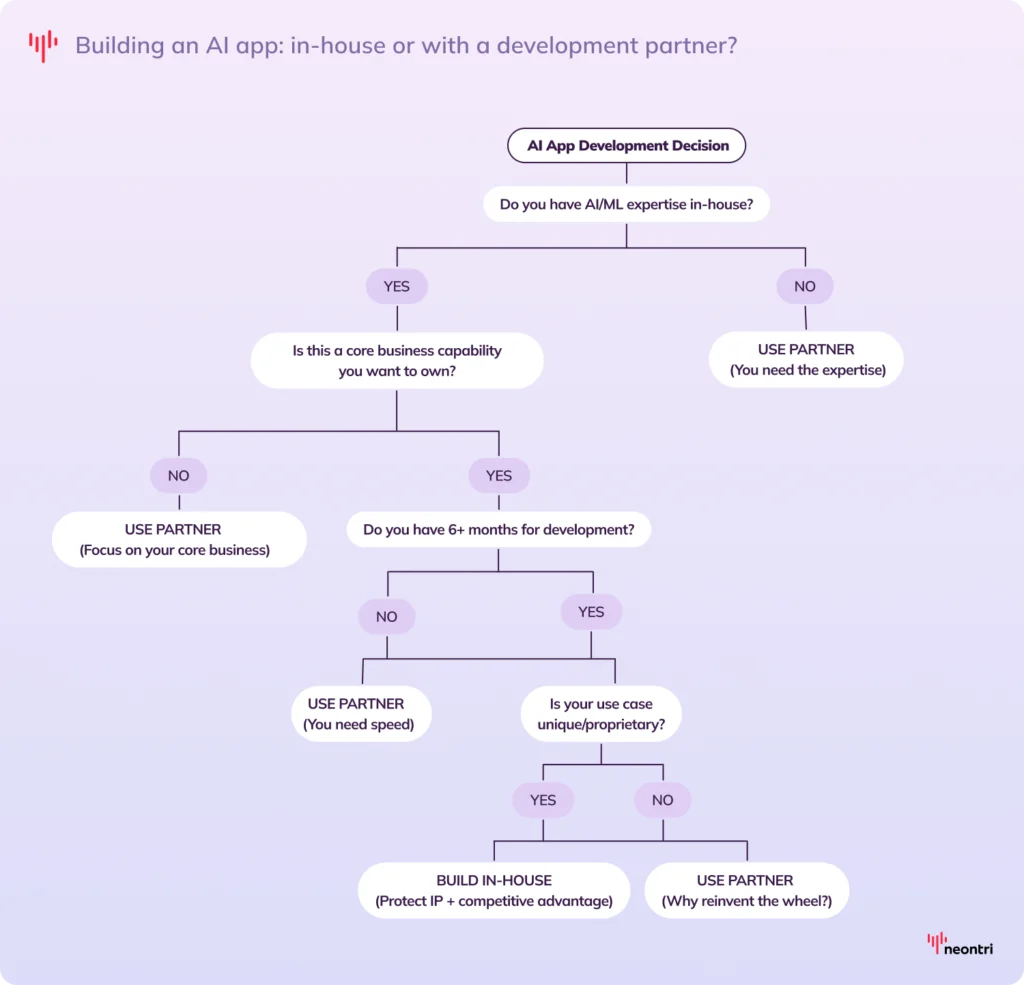
Should you build an AI app in-house or work with a development partner?
Deciding whether to build an AI app in-house or work with a vendor depends on factors like expertise, budget, timeline, and how central AI is to your business strategy. Answer the questions below to choose the right path.
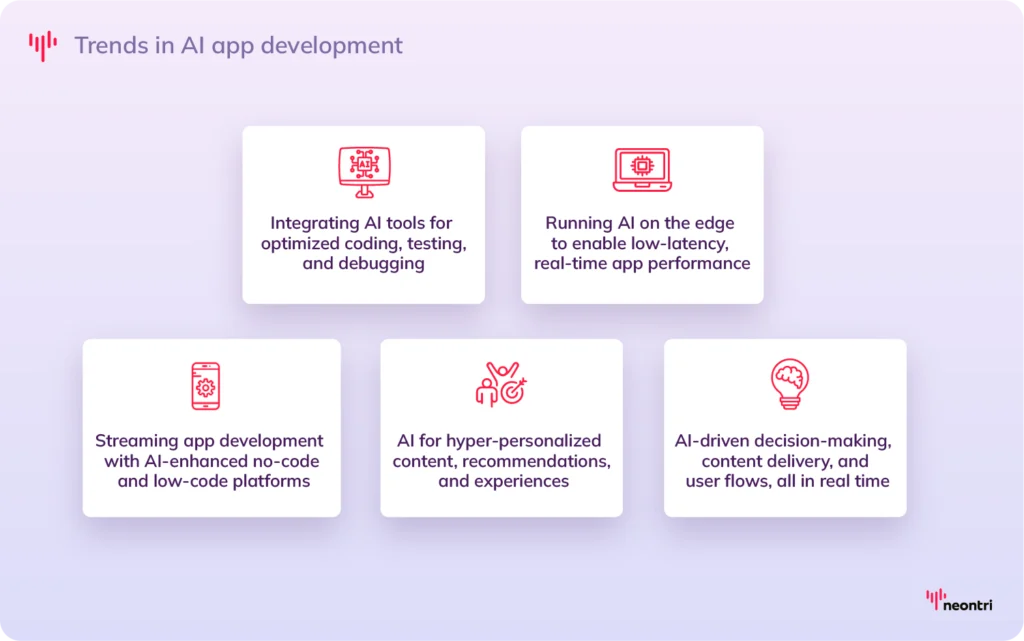
Trends in AI app development
AI app development is maturing faster than expected, powered by smarter tools and shifting business needs. New trends in mobile app development are reshaping how companies design, build, and scale AI-driven products across industries.
Final thoughts
AI app development creates new opportunities to scale, improve decision-making, and deliver richer user experiences. But success doesn’t just come from using advanced technology. It starts with clear goals, the right tools, and a strong development partner.
FAQ
How much does it cost to build an AI app?
AI app development costs might range from $10,000 to $500,000 (€8,700–€437,000), depending on complexity.
- Simple apps, like basic chatbots, typically cost $10,000–$40,000 (€8,700–€35,000).
- Mid-level apps generally fall between $40,000–$150,000 (€35,000–€131,000).
- Enterprise-grade solutions with custom ML models or compliance requirements often exceed $300,000–$500,000 (€262,000–€437,000).
What should businesses consider before starting AI app development?
Before starting, define what the AI app should achieve. Is it automating tasks, improving decisions or delivering personalized experiences? Then, confirm the data is reliable and take into consideration compliance needs, development and maintenance costs, and whether to build in-house or partner externally
How do you measure success in AI app development?
Start by tracking how well the app delivers on its business goals, like reducing costs, improving efficiency or increasing customer engagement. Other key indicators include model accuracy, reliability, and fairness, as well as user adoption and long-term ROI. A successful app not only works well at launch but continues to improve and scale over time.