
Over 70% of software used by Fortune 500 companies was developed more than 20 years ago, meaning vast amounts of enterprise data still reside in legacy environments. Yet when the time comes to modernize, too many projects fall into a familiar trap: Data is often treated like luggage to be packed up and moved, rather than a strategic asset to be reimagined.
This limited perspective overlooks the real value of migration. It is not just about transferring information into a new environment, but about using the process as an opportunity to improve data quality, enable smarter governance, and lay the foundation for analytics-driven decision-making.
Based on Neontri’s experience in core banking modernization services, this article offers a comprehensive roadmap for navigating the journey of data migration from legacy systems – balancing practical execution with strategic vision.
The guide provides a deep understanding of modernization strategies, common challenges and their solutions, as well as best practices for post-migration success.
Key takeaways:
- Organizations should view migration as a chance to improve data quality, governance, and analytics capabilities, rather than simply moving information from old systems to new ones.
- Even after a successful data transfer, enterprises must implement continuous monitoring, user training, and systematic validation processes to ensure the new system delivers expected benefits.
- Conducting comprehensive legacy system assessments, cleaning data before transfer, and implementing rigorous testing procedures are essential steps to avoid hidden errors, compatibility issues, and quality problems.
The critical need for legacy data migration
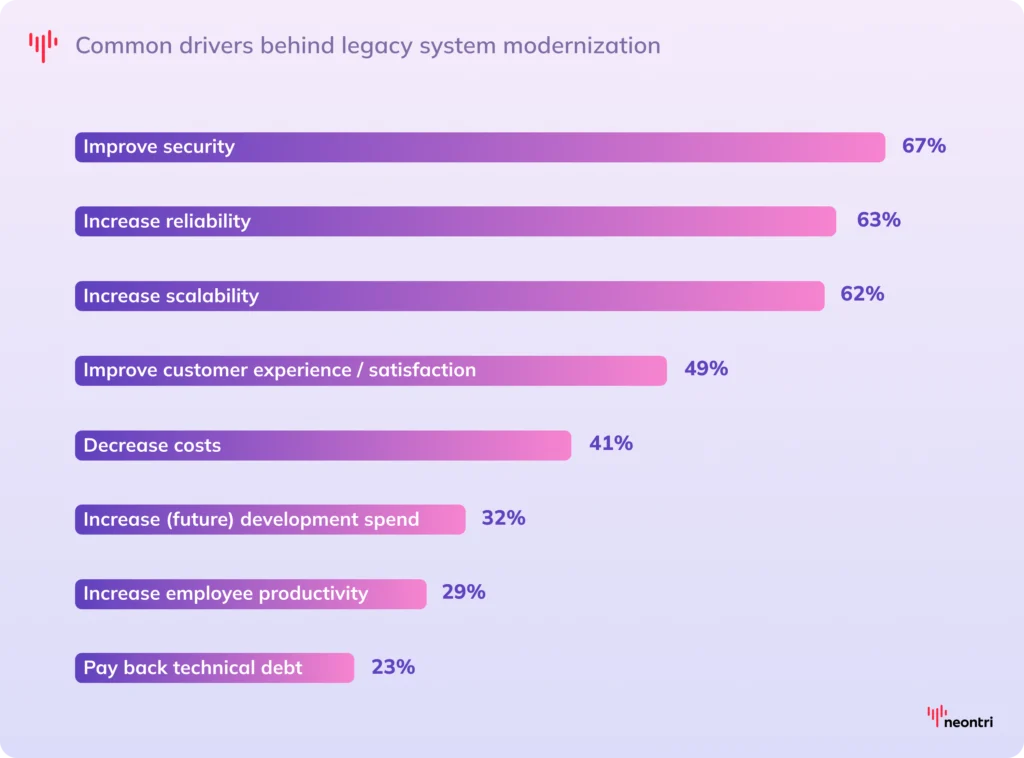
Many organizations find themselves stuck with legacy systems that were built decades ago, long before anyone could imagine today’s interconnected, data-driven digital landscape. These outdated software solutions often lack the flexibility, scalability, and integration capabilities necessary to keep pace with evolving business demands. Therefore, even the most change-resistant companies that rely on long-standing methods of data management eventually have to come to terms with modernization.
Even after successfully migrating from legacy systems, the true strategic advantage comes from seamlessly connecting all data points across the modern enterprise. Overcoming common data integration challenges is what ultimately transforms fragmented information into actionable intelligence.
- Outdated technology
Many mainframe systems still run on programming languages like COBOL, in which translation into newer environments often breaks functionality. This means developers must rebuild legacy applications rather than simply converting existing code, making maintenance and upgrades both time-consuming and costly.
- Security gaps
Legacy systems often lack support for modern encryption standards, multi-factor authentication, and real-time threat monitoring – leaving sensitive data exposed to potential attacks. As vendors phase out updates and patches, these systems become increasingly exposed to cyberattacks, compliance breaches, and data leaks.
- Limited scalability
As businesses grow, so does the volume of data and the complexity of processes. Old systems often lack the architectural flexibility to handle this increased load, leading to performance bottlenecks or system failures.
- High maintenance costs
Companies spend around 80% of their IT budgets just to keep the old systems running. They often depend on specialized hardware with rare and expensive replacement parts, as well as expert consultants who charge premium rates for their rare knowledge. Beyond these direct expenses, there is a hidden cost in productivity loss: employees waste hours working around clunky interfaces or manually transferring data between incompatible systems.
Data migration strategies: Finding the best fit
Migration is never a one-size-fits-all process. Every organization approaches modernization with different priorities, constraints, and levels of readiness. Factors such as the organization’s tolerance for risk, regulatory environment, data complexity, and the urgency of the migration timeline all play a decisive role in selecting the right migration model.
Big Bang migration
Also known as “rip and replace,” the Big Bang migration involves a complete system overhaul that happens in one go. It is often considered the simplest migration method because data is kept in its original format without transformation. Essentially, everything is moved “as is” from old to new platform during a single, carefully planned maintenance window. Once the migration is successfully completed, the legacy system is immediately decommissioned.
This approach can significantly shorten the overall migration timeline and allows organizations to replicate their workflows in new environments as quickly and cheaply as possible. However, this “lift-and-shift” mentality – while seemingly efficient – often results in accumulating technical debt, missed opportunities for improvement, and the adoption of the same outdated practices in a shiny new wrapper. Furthermore, this model carries higher risks, as any issues during the transition can lead to extended downtime or even data loss.
Trickle migration
Trickle migration follows a gradual, phased approach, transferring data incrementally over weeks or even months rather than all at once. System components are moved in planned stages, based on criteria such as information relevance, business priority, or usage patterns.
This step-by-step process not only reduces the risk associated with a full cutover but also opens the door for meaningful improvements along the way. For example, organizations can take advantage of the migration to replatform enterprise applications by moving data from on-premise servers to modern, cloud-native infrastructure components. They can redesign schemas, business logic, and workflows to better align with contemporary architectures such as microservices.
Parallel migration
In parallel migration, the old and new systems run alongside each other, with data synchronized continuously or at scheduled intervals. Both environments operate simultaneously during the transition, allowing users to test the new setting without disrupting ongoing business activities. Once the new system has been fully validated and its performance meets expectations, the legacy platform is safely retired.
Beyond simply migrating data, this model allows organizations to rethink and modernize the underlying architecture. Companies can use this phase to realign their data strategy with evolving business goals, revisiting how information is organized, accessed, and governed for better scalability, security, and efficiency.
While this model offers the highest level of risk mitigation, it can also be resource-intensive, requiring additional hardware infrastructure, maintenance, and coordination to support two systems running in tandem for an extended period.
| Strategy | Best for | Pros | Cons |
|---|---|---|---|
| Big Bang migration | -Small to medium databases -Organizations that can tolerate service interruptions -Systems with simple data structures | -Fastest overall completion -Clean break from legacy system -Lower complexity in planning | -High risk of extended downtime -Difficult to roll back if issues arise -All problems surface at once |
| Trickle migration | -Complex systems with multiple databases and/or historical data archives -Organizations with strict uptime requirements | -Minimal performance impact -Flexible schedule -Easier troubleshooting -Allows real-time validation | -Long migration timeline -Complex data routing -Need to maintain data sync between phases -Higher total cost |
| Parallel migration | -Complex enterprise environments -Mission-critical systems -Organizations that cannot afford any downtime | -Balances speed and safety -Easy rollback if problems occur -Customizable to business needs | -Resource-intensive -Requires expert project management -Potential data consistency issues |
Common challenges in legacy database migration
Data migration from legacy systems is rarely a smooth process. Even with careful planning, organizations face numerous obstacles that can derail timelines and inflate budgets. Understanding these common pitfalls helps teams prepare for a successful migration and avoid costly mistakes that could impact business operations.
Hidden errors
Over the years, enterprise systems accumulate data issues that are not apparent in daily operations but create massive problems during the migration process. They often contain duplicate records, inconsistent formats, corrupted files, and phantom entries.
For example, financial systems might have rounding issues where one system rounds cents to two decimals while another truncates them, causing balance sheet discrepancies of thousands of dollars across millions of rows. Moving such data “as is” into a new environment can compromise the data integrity of the target system or even cause the migration attempts to fail entirely.
Solution: Implement comprehensive data profiling and cleansing before migration begins. Start with thorough data audits to identify quality issues, establish standardized formats, and create validation rules. Use automated tools to remove duplicates, fill gaps, and standardize entries.
System compatibility
Legacy databases often store information in proprietary formats that don’t translate cleanly to new systems. There are several problems that can come out of this:
- Non-deterministic SQL operations: Some SQL queries in old systems don’t always produce the same output when run multiple times, even on the same info. When moved to a modern system, this unpredictability makes it hard to verify whether the migrated data is correct.
- Data type conflicts: Numeric values, timestamps, and text values can be interpreted differently across platforms. For example, a date stored as “MM-DD-YYYY” in one system might be misread as “DD-MM-YYYY” in another, causing errors after migration.
- Indexing incompatibility: Modern platforms may not support indexing methods that legacy databases depend on. Without this, searches and queries in the new environment can become much slower, hurting application performance.
- Collation mismatches: Differences in how text is sorted and compared can lead to errors with uppercase/lowercase letters, special characters, and the order in which symbols appear, that never existed in the original system.
If these issues are not addressed beforehand, the results can be damaging: queries fail, key data fields populate with null values, and previously functional applications begin throwing errors.
Solution: Develop detailed mapping documents that outline how each field in the legacy system corresponds to the new environment. Create transformation scripts to handle data format standardization and type conversions during migration. Test schema compatibility and establish fallback procedures for handling conflicting elements.
Business disruption
Every migration project involves at least some system downtime. During these windows, critical business processes may be unavailable, disrupting day-to-day operations and impacting employee productivity.
Some organizations underestimate the time needed for migration. Unexpected complications can extend planned maintenance windows and leave organizations stranded between failing old systems and incomplete new ones. What should be clean transitions turn into prolonged system lags, user frustration, and endless troubleshooting, amplifying the impact on business performance.
Solution: Plan migrations during off-peak hours and implement phased approaches that move info in small, manageable chunks. Use incremental data transfer techniques and stress-test performance to identify bottlenecks before they slow operations.
Security and compliance
Data migration creates security vulnerabilities as sensitive information moves between systems and potentially across networks. Inadequate encryption during transfer can expose confidential data to breaches and unauthorized access. Legacy systems often lack modern security features, making it difficult to maintain protection during transition periods.
Additionally, compliance requirements may dictate specific handling procedures that complicate the migration process. For example, under GDPR, personal data transfers outside the European Economic Area are allowed only within approved jurisdictions or must be accompanied by adequate safeguards, such as Standard Contractual Clauses. Failing to meet these requirements during migration can lead to severe penalties.
Solution: Implement robust security measures throughout the migration process, such as encryption for data at rest and in transit, and secure transfer protocols. Work with legal and compliance teams to verify that migration procedures meet all regulatory requirements and industry standards. This includes maintaining detailed logs of all migration activities and data movements for audit purposes, following data retention policies, and implementing proper access controls that limit exposure to sensitive information.
Project scope creep
Migration projects often suffer from unclear objectives and uncontrolled scope changes that lead to delays and budget overruns. Here are common root causes:
- Inadequate risk assessment. Organizations may overlook the complexity of data relationships, including hidden dependencies, inconsistent formats, and integration challenges with existing systems.
- Poor resource allocation. If critical skills are spread too thin or assigned too late, teams quickly find themselves in a constant game of catch-up.
- Weak change management. Without clear communication, targeted training, and a strategy to bring users on board, resistance builds and adoption falters. Stakeholder misalignment, shifting priorities, and competing agendas can further pull the project off course.
Solution: Develop a comprehensive project plan that outlines detailed risk assessments, resource commitments, and contingency measures to keep the effort on track. Establish regular review checkpoints to monitor progress and address issues before they become major problems. Offer user training, effective communication, and ongoing support to maximize adoption of new systems.
How to plan legacy system modernization: Step-by-step roadmap
Planning a successful data migration from legacy systems requires a well-structured approach that balances technical, operational, and business priorities. With a clear roadmap in place, organizations can minimize risks, maintain business continuity, control costs, and ensure a smooth transition that unlocks the full potential of the new environment.

Step #1: Conduct legacy system assessment
Any successful migration plan begins with a deep understanding of the current state of affairs. Start by examining the existing infrastructure – its architecture, data types, dependencies, and inherent limitations. This isn’t just a technical exercise; it’s the blueprint that will shape every subsequent planning decision.
A thorough review should document the current system’s performance, highlight bottlenecks, and create a complete catalog of all data sources, noting their formats, volumes, and relationships. Particular attention should be paid to fragmented datasets spread across multiple tables, inconsistent field naming conventions, and proprietary standards that could pose challenges during migration.
For business-critical legacy systems, where overlooked dependencies can lead to downtime or costly rework, software audit services can reduce uncertainty before the migration strategy is finalized.
Step #2: Define migration scope
The next step is to define exactly what the migration should achieve. Having well-defined goals not only prevents scope creep but also ensures that the project remains focused on delivering tangible business value. Objectives might include strengthening data security, reducing operational costs, or enabling integration with modern platforms.
Collaboration is key during this stage. It builds organizational buy-in and reduces the likelihood of unexpected challenges emerging once migration is underway. Moreover, engaging stakeholders from across departments helps identify which data elements are crucial, how different datasets relate to one another, and what customizations will be required in the new system.
Step #3: Clean legacy data
Before moving to a new system, it is essential to take a hard look at the quality of the existing data. Cleaner data means reduced storage needs, better system performance, and a lower risk of carrying over quality issues into the new environment.
A comprehensive audit can help uncover redundant, outdated, or irrelevant information that has no place in modernized architecture. During this process, special attention should be given to duplicate records, inconsistent entries, incomplete fields, and obsolete information that clutters systems and causes confusion for users.
Step #4: Design target database schema
Today’s databases use different structures from legacy counterparts. Therefore, the modernization process requires careful schema design to ensure the new framework can fully support business needs. For example, migrating from a traditional relational database to a NoSQL platform such as MongoDB involves a shift in thinking – from organizing information in rows and tables to grouping it into collections and documents.
To bridge this gap, create a detailed data mapping document. This should cover checks for data type compatibility, validation of field length limits, and safeguards to preserve critical relationships between datasets.
In some cases, transformation scripts will be needed to convert formats, address collation mismatches, or adjust indexing strategies to match the capabilities of the new platform. By handling these considerations early, teams can avoid costly rework and ensure that the migrated data functions seamlessly in its new home.
Step #5: Implement testing procedures
Thorough testing is the backbone of an efficient migration, ensuring that both the data and the system function as intended in the new environment. This begins with designing QA procedures that cover every critical aspect – data accuracy, system functionality, performance under load, and integration with other platforms.
Using sandbox environments that closely replicate production systems allows teams to experiment and validate changes without putting live data at risk. Building multiple testing cycles into the plan – each using different datasets and scenarios – helps ensure that the migration process is resilient and reliable under varied conditions.
Step #6: Do a pilot migration
Before committing to a full-scale system overhaul, it’s a good idea to run a pilot migration with a representative sample of the data. This controlled trial reveals potential pitfalls, offers opportunities to test backup and recovery procedures, and serves as a hands-on training exercise for the team.
Fine-tuning transformation scripts, updating data protection measures, and optimizing system performance based on pilot feedback will help ensure the live migration proceeds with minimal friction. Every issue encountered should be documented alongside the solutions applied, creating a ready-made playbook for the final execution phase.
Step #7: Launch the data migration process
The final migration must be carefully timed to reduce operational disruption. Ideally, it should be scheduled during periods of low activity – such as weekends, holidays, or off-peak hours. Where feasible, using incremental data transfers can further reduce system stress, spread risk, and make troubleshooting more manageable.
What comes next: Key post-migration actions
The post-migration phase is just as critical as the migration itself. But now the focus shifts from execution to ensuring the new database is stable, reliable, and delivering the expected results. To achieve this, organizations should follow a set of practices that help maintain system performance and unlock long-term value.
Thorough data validation
Even after extensive pre-migration testing, the reality is that certain issues may only reveal themselves once the new system is in active use. Subtle problems, such as missing records, incorrect field mappings, or formatting inconsistencies, can slip through earlier checks and disrupt day-to-day operations.
To safeguard against these risks, it’s important to adopt a well-rounded verification process that creates a robust safety net, helping businesses detect and resolve issues early on. It typically blends several complementary approaches:
- Targeted validation scripts can help quickly flag anomalies and highlight potential discrepancies between the source and destination data.
- Statistical sampling provides a way to spot potential data corruption or transformation errors that may not be immediately visible during standard checks.
- Business rule validations confirm that critical calculations, logic flows, and workflows continue to produce the expected results, maintaining consistency with established business operations.
- Parallel report comparisons compare reports from the legacy and new systems to ensure that key metrics match historical baselines, reinforcing confidence in the data’s integrity.
- End-user feedback offers valuable insights from those working directly with the system that help to uncover practical issues that automated checks might overlook.
Continuous monitoring
Once the new system is live, maintaining stability and performance becomes a top priority. A strong monitoring framework plays a pivotal role here – one designed not only to react to problems but to anticipate them. This framework blends automated data quality checks, which continuously validate accuracy, completeness, and freshness, with system health dashboards that offer a consolidated view of infrastructure performance. Intelligent alerting ensures that any potential issues rise to immediate attention, enabling rapid resolution.
Embedding these capabilities into daily operations transforms monitoring from a technical safeguard into a strategic enabler. Instead of relying on reactive fixes, teams can make proactive adjustments informed by real-time insights, reducing downtime and improving user experience.
Training and support
A successful migration is measured not only by technical performance but also by how effectively people embrace the new system. Even the most advanced platform can fall short of its potential if users are unsure how to leverage its capabilities. Reviewing adoption levels and identifying training needs early helps prevent productivity dips and builds confidence among staff.
Targeted, role-specific training ensures that each team learns the features most relevant to their work. Hands-on workshops, live demonstrations, and practical scenarios give employees the opportunity to apply what they learn immediately, reinforcing knowledge through experience. Refresher sessions, quick-reference guides, and always-available support channels keep skills sharp over time.
Legacy system sunsetting
Decommissioning the old system is a critical phase that deserves as much attention as launching the new platform. Before fully retiring legacy applications, it’s essential to archive historical data in line with regulatory and compliance requirements. This preserves institutional knowledge, ensuring critical information remains accessible for audits, reporting, or future reference. Archiving should include secure, long-term storage solutions that keep data intact regardless of evolving technologies.
Once confident that the new system is fully operational, the organization can proceed with decommissioning old hardware, canceling unused software licenses, and revoking access to legacy environments. This step reduces maintenance costs, frees up valuable resources, and eliminates security risks associated with outdated systems.
Neontri recommendations for seamless data migration
Successful data migration requires more than technical execution – it demands a trusted partner who can turn a complex process into a catalyst for growth. With deep experience and proven methodologies, Neontri helps organizations navigate every stage of modernization, from initial assessment to post-migration optimization.
With over 10 years of hands-on experience working with leading companies across the retail, fintech, and banking industries, our experts have helped organizations navigate some of the most demanding projects. Our track record spans both banking and large-scale enterprise environments, which gives us unique insights into legacy migration strategies. Drawing on our expertise, we’ve outlined key recommendations for each sector.
Data migration recommendations for banks
The banking sector operates under intense scrutiny, where compliance with regulatory frameworks, zero tolerance for transaction errors, and uninterrupted customer access are non-negotiable. Even minor missteps during migration can disrupt services, trigger compliance breaches, or cause reputational damage. Here are some tips on how to avoid that:
- Adopt parallel migration to validate new systems in real-world conditions while maintaining uninterrupted operations.
- Implement rigorous testing frameworks covering transaction accuracy, data reconciliation, and system performance.
- Strengthen governance and auditability with clear accountability, traceability, and reporting mechanisms.
- Engage cross-functional teams that include IT, compliance, operations, and customer-facing units early on to align priorities and minimize blind spots.
Data migration recommendations for enterprises
The challenges of data migration in large enterprises are shaped by their size, diversity of operations, and often decades-old technology stacks. Legacy systems may span multiple regions, business units, and regulatory jurisdictions, with countless custom integrations that can complicate the modernization path. In many cases, the organization’s data estate is a patchwork of formats, storage locations, and governance models, making consistency and interoperability key priorities. To achieve that, enterprises should
- Adopt phased or hybrid migration approaches to minimize disruption while enabling early learnings across business units.
- Prioritize data standardization and quality to unify disparate formats, storage systems, and governance models.
- Leverage automation and synchronization tools for handling large volumes efficiently and ensuring real-time consistency.
- Align migration milestones with business priorities so that technology transformation supports strategic objectives.
Final thoughts
Data migration from legacy systems represents one of the most critical yet challenging aspects of digital transformation. While the technical complexities are significant, the real measure of success lies not in how seamlessly data moves from point A to point B, but in how effectively organizations leverage this transition to build stronger, more agile, and future-ready data foundations.
This is where the right expertise makes all the difference. At Neontri, we help organizations transform migration from a risky necessity into a strategic advantage. Don’t let outdated systems hold back your organization’s growth potential. Get started with a comprehensive legacy database assessment and migration strategy consultation.